
Version 2.0.0
What and Why
Every spring, elementary teams face the same puzzle: how do you build next year’s class lists so that no single room ends up with a disproportionate number of students who need intensive support while another room has almost none? In most buildings I’ve worked with, this process involves sticky notes on a table, a shared spreadsheet with color-coded cells, or a commercial tool that costs more than the supply budget can justify. The sticky-note method works, but it’s slow. The color-coded spreadsheet works, but it’s fragile. And the commercial tool works, but it comes with a subscription, a login, and a sales rep who emails you in July.
The Student Roster Generator is a Google Apps Script tool bound to a Google Sheet. You paste or enter your student data, set a few balancing rules, and the tool distributes students across classrooms as evenly as it can based on the characteristics you care about: SPED status, behavior considerations, ELL identification, gifted designation, and reading level. You can also add custom fields if your building tracks things like attendance concerns or specific program placement. If certain students need to be kept together, kept apart, or placed in a particular room, there’s a constraints system for that too.
This tool is built for elementary teams doing annual roster construction, though it could work in any setting where you need to distribute people across groups based on multiple characteristics. It requires a Google Workspace account (the free personal Gmail version works fine) and runs entirely within your spreadsheet. No external accounts, no data leaving your Google Drive, no subscription.
A few things it intentionally does not do: it won’t pull student data from your SIS automatically, it won’t account for teacher preferences or styles (that’s a human conversation), and it won’t guarantee a perfect distribution every time. Balancing is a constrained optimization problem, and sometimes the math doesn’t work out cleanly when you have hard caps and relationship constraints competing with each other. The tool will tell you when constraints couldn’t be satisfied, which is more than the sticky notes will do.
Quick Look
When you open the tool from the Roster Generator menu in your spreadsheet, you’ll see a dialog window that walks you through six tabs: entering student data, adding optional custom fields, configuring classroom settings, setting balancing weights, defining relationship constraints, and viewing results.
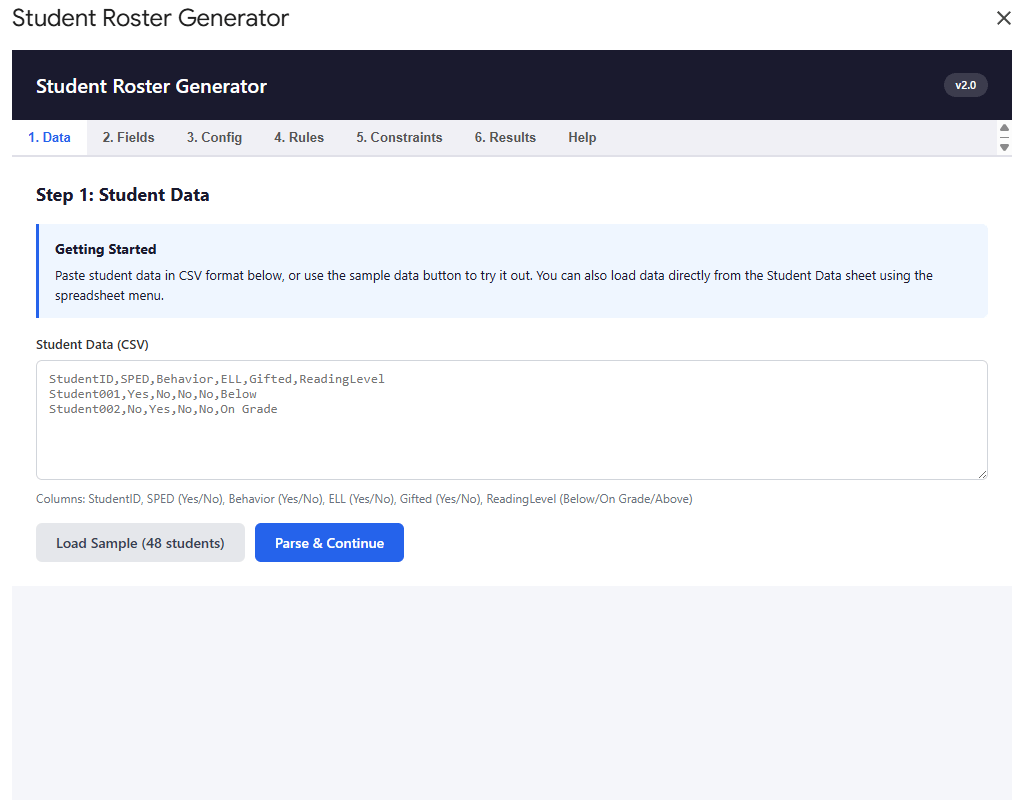
The tool also saves generated rosters to a “Generated Rosters” sheet in your workbook, so you have a flat record you can print, share, or export to PDF.
Get Started
Step 1: Make a copy of the template.
When you click that link, Google will ask if you want to make a copy. Say yes. This creates your own independent version of the spreadsheet and its attached script. The original template isn’t affected by anything you do in your copy, and nobody else can see your data.
If you’ve never made a copy of a Google Sheet before, here’s what to expect: Google opens a new tab with a file called “Copy of Student Roster Generator DEFAULT.” You can rename it to whatever makes sense for your building. The script is already attached; you don’t need to do anything with the Apps Script editor unless you want to.
Walk Through It With Me
Step 2: Authorize the script.
The first time you use the tool, Google will ask you to authorize it. This is normal. Because the script needs to read and write data within your spreadsheet (and only your spreadsheet), Google requires you to grant permission.
Here’s what that looks like: you’ll see a screen that says “This app isn’t verified.” That sounds alarming, but it just means the script hasn’t gone through Google’s formal review process. Since you own the copy, this is expected. Click “Advanced,” then “Go to Student Roster Generator (unsafe).” I know the word “unsafe” doesn’t inspire confidence, but this is standard for any Apps Script project that hasn’t been published to the Google Workspace Marketplace. The script only accesses the spreadsheet it’s bound to.
At this point, you should see the Roster Generator menu appear in your menu bar, between “Extensions” and “Help.”
Step 3: Check the Config tab.
Click on the Config tab in your spreadsheet. You’ll see a list of settings with default values and descriptions. For your first run, the defaults are reasonable and you don’t need to change anything. But here’s what they control:
The MAX and MIN STUDENTS PER CLASS settings define the guardrails for classroom size. The DEFAULT CLASSROOMS value is just a starting suggestion; you can override it each time you run the tool.
The WEIGHT values (SPED_WEIGHT, BEHAVIOR_WEIGHT, ELL_WEIGHT, GIFTED_WEIGHT) tell the algorithm how aggressively to balance each characteristic across classrooms. A weight of 5 means the algorithm tries hard to equalize that category. A weight of 1 means it considers it but won’t sacrifice other priorities to get there. These run on a 1-10 scale.
The MAX values (SPED_MAX, BEHAVIOR_MAX, etc.) are hard caps. If you set SPED_MAX to 6, no classroom will have more than 6 SPED students regardless of what the balancing algorithm wants to do. A value of 0 means no cap.
If you already know how to configure these, skip to Step 4.
Step 4: Enter student data.
You have two paths here, depending on what’s more comfortable.
Path A: Use the dialog tool. Go to Roster Generator > Open Roster Tool. In the Data tab, paste your student information in CSV format. Each line should follow this pattern: StudentID, SPED (Yes/No), Behavior (Yes/No), ELL (Yes/No), Gifted (Yes/No), ReadingLevel (Below/On Grade/Above). If you want to see what this looks like before committing your real data, click “Load Sample (48 students)” and the tool will generate a randomized set you can experiment with.
Click “Parse & Continue” and the tool will confirm how many students it found and break down the counts by category.
Path B: Use the Student Data sheet. Go to Roster Generator > Setup Student Data Sheet. This creates a tab with the right headers and dropdown validation already in place. Type or paste your student data directly into the sheet. When you’re ready, use Roster Generator > Generate from Student Data Sheet to run the algorithm without opening the dialog at all.
Path A gives you more control over custom fields, weights, and constraints. Path B is faster if you just want to generate rosters with the Config tab defaults. I’d recommend starting with Path A your first time so you can see all the options, then switching to Path B once you’ve settled on settings that work for your building.
At this point, you should see your student data parsed with a summary of how many students fall into each category.
Step 5: Walk through the remaining tabs (if using the dialog).
The Fields tab lets you add custom boolean fields beyond the four defaults. If your team tracks something like “attendance concern” or “new to building,” you can add it here and the algorithm will factor it into balancing. For your first run, I’d suggest skipping this.
The Config tab in the dialog mirrors your spreadsheet Config tab. It loads whatever values you set there, but you can override them for this particular run without changing the sheet.
The Rules tab is where you adjust the balancing weights and caps. Again, your Config tab defaults will be pre-loaded. If you want SPED distribution to matter more than ELL distribution for this run, bump the SPED weight up and the ELL weight down.
The Constraints tab is where the human knowledge lives. This is the part that sticky notes actually do well, and it’s the part most commercial tools handle poorly. You can define three types of constraints: keep two students separate (siblings, known conflicts), keep two students together (peer buddy pairs, co-enrolled services), or assign a specific student to a specific classroom (IEP requirements, parent agreements). Add as many as you need. The tool will tell you afterward which constraints it was able to satisfy and which ones conflicted with each other or with the balancing rules.
Step 6: Generate rosters.
Click “Generate Balanced Rosters.” The tool will think for a moment, then switch you to the Results tab. You’ll see a summary at the top with overall statistics, a constraint report showing which rules were satisfied or violated, and then a card for each classroom listing every student with their characteristic badges.
At the same time, the tool writes a “Generated Rosters” sheet into your workbook with the same information in a flat format you can print or export.
At this point, you should see classroom cards with student names, colored badges, and a statistics grid showing the distribution is roughly even across rooms.
Common first-run hiccups:
If the Roster Generator menu doesn’t appear, try refreshing the page. The onOpen trigger sometimes takes a moment to register on a fresh copy.
If you see “No data returned from server” after generating, check the Logs sheet (the tool creates one automatically when DEBUG_MODE is set to TRUE in Config). This usually means the student data had a formatting issue the parser couldn’t recover from.
If a constraint shows as “violated” in the results, it means the algorithm couldn’t satisfy that constraint without breaking a hard cap or another constraint. The tool prioritizes hard caps over soft constraints, which is usually the right behavior. If it’s not, you might need to raise a cap or remove a competing constraint.
Make It Yours
If you got rosters generated on your first run, that’s the win. Everything from here is refinement.
Safe to change anytime:
The Config tab values are all safe to adjust. The weights and caps will just shift how aggressively the algorithm balances each characteristic. I’d suggest running the tool a few times with different weight combinations and comparing the results. You’ll develop a feel for how the numbers interact with your specific student population pretty quickly.
The number of classrooms and size limits are also safe to change between runs. The tool generates fresh each time; it doesn’t remember previous results.
Worth exploring once you’re comfortable:
Custom fields can handle any additional boolean characteristic your team wants to balance for. If your building does looping and wants to track which students had a particular teacher last year, you could add that as a custom field and use a separation constraint to distribute evenly.
The “Generate from Student Data Sheet” menu option bypasses the dialog entirely. If you keep your Student Data sheet updated throughout the year, roster generation becomes a two-click process: menu > generate > done.
If you want to go further:
The script itself is readable and commented. If you’re comfortable with Google Apps Script (or curious enough to poke around), the balancing algorithm lives in the balanceStudentsAcrossClassrooms function. The multi-pass approach handles assigned constraints first, then together-groups, then distributes remaining students by priority. Understanding that flow can help you reason about why the tool makes the choices it does.
If you turn DEBUG_MODE to TRUE in the Config tab, the tool logs its decisions to a Logs sheet. This is useful if you’re trying to understand why a particular student ended up in a particular room.
Connect and Continue
I built this tool because I watched a team spend an entire afternoon moving sticky notes around a table, and I kept thinking there had to be a way to get a solid first draft faster so the team could spend their time on the conversations that actually require human judgment. The algorithm handles the math. The team handles the context.
If you run into issues, have ideas for improvement, or just want to share how it went, reach out at licht.education@gmail.com. I’m happy to connect.
For more tools and resources, visit bradylicht.com.
Code Backup
Must be bound to a Google Sheet. Click here to see and expand the code.
Code.gs
/** * STUDENT ROSTER GENERATOR - Sheet-Bound Edition * Automated classroom balancing tool for elementary schools * * Version: 2.0.0 * Last Updated: February 2026 * * This script is bound to a Google Sheet and uses a Config tab * for all configurable settings. Open the tool from the * "Roster Generator" menu in the spreadsheet. */// ============================================================================// CONFIGURATION (loaded from Config sheet)// ============================================================================/** * Load configuration from the Config sheet. * Falls back to defaults if values are missing. * @returns {Object} Configuration object */function getConfig() { var ss = SpreadsheetApp.getActiveSpreadsheet(); var sheet = ss.getSheetByName('Config'); if (!sheet) { setupConfigSheet(); sheet = ss.getSheetByName('Config'); } // Read key-value pairs from columns A and B var data = sheet.getRange('A2:B20').getValues(); var config = {}; data.forEach(function(row) { if (row[0]) { config[row[0]] = row[1]; } }); return { DEBUG_MODE: config['DEBUG_MODE'] === true || config['DEBUG_MODE'] === 'TRUE', MAX_STUDENTS_PER_CLASS: parseInt(config['MAX_STUDENTS_PER_CLASS']) || 28, MIN_STUDENTS_PER_CLASS: parseInt(config['MIN_STUDENTS_PER_CLASS']) || 20, DEFAULT_CLASSROOMS: parseInt(config['DEFAULT_CLASSROOMS']) || 4, SPED_WEIGHT: parseFloat(config['SPED_WEIGHT']) || 5.0, SPED_MAX: parseInt(config['SPED_MAX']) || 6, BEHAVIOR_WEIGHT: parseFloat(config['BEHAVIOR_WEIGHT']) || 5.0, BEHAVIOR_MAX: parseInt(config['BEHAVIOR_MAX']) || 5, ELL_WEIGHT: parseFloat(config['ELL_WEIGHT']) || 3.0, ELL_MAX: parseInt(config['ELL_MAX']) || 0, GIFTED_WEIGHT: parseFloat(config['GIFTED_WEIGHT']) || 2.0, GIFTED_MAX: parseInt(config['GIFTED_MAX']) || 0 };}/** * Create the Config sheet with default values and formatting. */function setupConfigSheet() { var ss = SpreadsheetApp.getActiveSpreadsheet(); var sheet = ss.getSheetByName('Config'); if (!sheet) { sheet = ss.insertSheet('Config'); } else { sheet.clear(); } var headers = [['Setting', 'Value']]; sheet.getRange(1, 1, 1, 2).setValues(headers); var defaults = [ ['DEBUG_MODE', false], ['MAX_STUDENTS_PER_CLASS', 28], ['MIN_STUDENTS_PER_CLASS', 20], ['DEFAULT_CLASSROOMS', 4], ['SPED_WEIGHT', 5.0], ['SPED_MAX', 6], ['BEHAVIOR_WEIGHT', 5.0], ['BEHAVIOR_MAX', 5], ['ELL_WEIGHT', 3.0], ['ELL_MAX', 0], ['GIFTED_WEIGHT', 2.0], ['GIFTED_MAX', 0] ]; sheet.getRange(2, 1, defaults.length, 2).setValues(defaults); // Add descriptions in column C var descriptions = [ ['Description'], ['Enable detailed logging (TRUE/FALSE)'], ['Maximum students allowed per classroom'], ['Minimum students per classroom'], ['Default number of classrooms to generate'], ['Balancing weight for SPED students (1-10, higher = more important)'], ['Hard cap on SPED students per classroom (0 = no limit)'], ['Balancing weight for Behavior students (1-10)'], ['Hard cap on Behavior students per classroom (0 = no limit)'], ['Balancing weight for ELL students (1-10)'], ['Hard cap on ELL students per classroom (0 = no limit)'], ['Balancing weight for Gifted students (1-10)'], ['Hard cap on Gifted students per classroom (0 = no limit)'] ]; sheet.getRange(1, 3, descriptions.length, 1).setValues(descriptions); // Format header row var headerRange = sheet.getRange(1, 1, 1, 3); headerRange.setFontWeight('bold'); headerRange.setBackground('#4285f4'); headerRange.setFontColor('white'); sheet.setFrozenRows(1); // Format setting names sheet.getRange(2, 1, defaults.length, 1).setFontWeight('bold'); // Format description column sheet.getRange(2, 3, descriptions.length - 1, 1).setFontColor('#666666').setFontStyle('italic'); // Set column widths sheet.setColumnWidth(1, 220); sheet.setColumnWidth(2, 120); sheet.setColumnWidth(3, 400); // Protect the setting names column sheet.getRange(2, 1, defaults.length, 1).setBackground('#f8f9fa');}/** * Version check for deployment verification */function checkVersion() { return { version: '2.0.0', timestamp: new Date().toISOString(), message: 'Sheet-bound edition with Config tab', changes: [ 'Removed external branding', 'Bound to Google Sheet', 'Config tab for all settings', 'Streamlined UI' ] };}// ============================================================================// MENU AND DIALOG ENTRY POINTS// ============================================================================/** * Add custom menu when spreadsheet opens */function onOpen() { var ui = SpreadsheetApp.getUi(); ui.createMenu('Roster Generator') .addItem('Open Roster Tool', 'showRosterDialog') .addSeparator() .addItem('Setup Config Sheet', 'setupConfigSheet') .addItem('Setup Student Data Sheet', 'setupStudentDataSheet') .addSeparator() .addItem('Generate from Student Data Sheet', 'generateFromSheet') .addItem('Clear Generated Rosters', 'clearAllRosters') .addItem('Export Rosters to PDF', 'exportRostersToPDF') .addToUi();}/** * Open the roster generator as a modal dialog */function showRosterDialog() { var config = getConfig(); var html = HtmlService.createHtmlOutputFromFile('index') .setWidth(1000) .setHeight(750); SpreadsheetApp.getUi().showModalDialog(html, 'Student Roster Generator');}/** * Return config values to the frontend */function getConfigForFrontend() { var config = getConfig(); return { success: true, config: config };}/** * Set up the Student Data sheet with proper headers */function setupStudentDataSheet() { var ss = SpreadsheetApp.getActiveSpreadsheet(); var sheet = ss.getSheetByName('Student Data'); if (!sheet) { sheet = ss.insertSheet('Student Data'); } if (sheet.getLastRow() === 0) { var headers = ['StudentID', 'SPED', 'Behavior', 'ELL', 'Gifted', 'ReadingLevel']; sheet.getRange(1, 1, 1, headers.length).setValues([headers]); var headerRange = sheet.getRange(1, 1, 1, headers.length); headerRange.setFontWeight('bold'); headerRange.setBackground('#4285f4'); headerRange.setFontColor('white'); sheet.setFrozenRows(1); sheet.autoResizeColumns(1, headers.length); // Add data validation for Yes/No columns var yesNoRule = SpreadsheetApp.newDataValidation() .requireValueInList(['Yes', 'No']) .setAllowInvalid(false) .build(); sheet.getRange(2, 2, 500, 4).setDataValidation(yesNoRule); var readingRule = SpreadsheetApp.newDataValidation() .requireValueInList(['Below', 'On Grade', 'Above']) .setAllowInvalid(false) .build(); sheet.getRange(2, 6, 500, 1).setDataValidation(readingRule); SpreadsheetApp.getUi().alert('Student Data sheet created with headers and validation rules.'); } else { SpreadsheetApp.getUi().alert('Student Data sheet already exists.'); }}// ============================================================================// MAIN ROSTERING FUNCTION// ============================================================================/** * Generate balanced class rosters * @param {Object} params - Rostering parameters from the frontend * @returns {Object} Generated rosters and statistics */function generateRosters(params) { var config = getConfig(); var logger = createLogger('GenerateRosters'); try { logger.log('Starting roster generation', 'INFO'); if (!params.students || !params.numClassrooms) { return { success: false, error: 'Missing required parameters: students and numClassrooms' }; } var students = typeof params.students === 'string' ? JSON.parse(params.students) : params.students; logger.log('Received ' + students.length + ' students for ' + params.numClassrooms + ' classrooms', 'INFO'); var customFields = params.customFields || []; var constraintRules = params.constraintRules || []; // Convert rules format from frontend to backend var rules = convertRulesFormat(params.rules, customFields, config); // Validate constraint rules var validation = validateConstraintRules(constraintRules, students); if (!validation.valid) { logger.log('Constraint warnings: ' + validation.warnings.join(', '), 'WARNING'); } // De-identify students var deidentifiedStudents = deidentifyStudents(students); // Generate rosters var rosters = balanceStudentsAcrossClassrooms( deidentifiedStudents, params.numClassrooms, rules, customFields, constraintRules, config ); // Verify assignments var totalAssigned = rosters.reduce(function(sum, r) { return sum + r.students.length; }, 0); logger.log('Assigned ' + totalAssigned + ' of ' + deidentifiedStudents.length + ' students', 'INFO'); if (totalAssigned < deidentifiedStudents.length) { logger.log('WARNING: Not all students assigned', 'ERROR'); } var stats = calculateRosterStatistics(rosters, customFields); var constraintReport = validateConstraintsInRosters(rosters, constraintRules); if (params.saveToSheet) { saveRostersToSheet(rosters, stats, customFields); } logger.log('Roster generation complete', 'SUCCESS'); return { success: true, rosters: rosters, statistics: stats, constraintReport: constraintReport, message: 'Created ' + params.numClassrooms + ' balanced classrooms with ' + totalAssigned + ' students', customFields: customFields, debugInfo: { totalStudents: deidentifiedStudents.length, totalAssigned: totalAssigned, unassigned: deidentifiedStudents.length - totalAssigned } }; } catch (error) { logger.log('Error: ' + error.message, 'ERROR'); return { success: false, error: error.message, stack: error.stack }; }}/** * Convert rules from frontend format to backend format. * Frontend sends: { sped: { weight: 5, maxPerClass: 6 } } * Backend needs: { spedWeight: 5, maxSpedPerClass: 6 } */function convertRulesFormat(htmlRules, customFields, config) { if (!htmlRules) { return getDefaultRules(config); } if (htmlRules.spedWeight !== undefined) { return htmlRules; } var backendRules = {}; var defaultFields = ['sped', 'behavior', 'ell', 'gifted']; defaultFields.forEach(function(field) { if (htmlRules[field]) { backendRules[field + 'Weight'] = htmlRules[field].weight || 3.0; if (htmlRules[field].maxPerClass) { backendRules['max' + capitalizeFirst(field) + 'PerClass'] = htmlRules[field].maxPerClass; } } }); if (customFields) { customFields.forEach(function(field) { var fieldName = field.name; if (htmlRules[fieldName]) { backendRules[fieldName + 'Weight'] = htmlRules[fieldName].weight || 3.0; if (htmlRules[fieldName].maxPerClass) { backendRules['max' + capitalizeFirst(fieldName) + 'PerClass'] = htmlRules[fieldName].maxPerClass; } } }); } return backendRules;}function capitalizeFirst(str) { return str.charAt(0).toUpperCase() + str.slice(1);}function getDefaultRules(config) { config = config || getConfig(); return { spedWeight: config.SPED_WEIGHT, behaviorWeight: config.BEHAVIOR_WEIGHT, ellWeight: config.ELL_WEIGHT, giftedWeight: config.GIFTED_WEIGHT, maxSpedPerClass: config.SPED_MAX || null, maxBehaviorPerClass: config.BEHAVIOR_MAX || null, maxEllPerClass: config.ELL_MAX || null, maxGiftedPerClass: config.GIFTED_MAX || null };}// ============================================================================// VALIDATION FUNCTIONS// ============================================================================function validateConstraintRules(constraints, students) { var warnings = []; var studentIds = students.map(function(s) { return s.id; }); constraints.forEach(function(constraint, index) { if (constraint.type === 'separate' || constraint.type === 'together') { if (!studentIds.includes(constraint.student1)) { warnings.push('Constraint ' + (index + 1) + ': Student ' + constraint.student1 + ' not found'); } if (!studentIds.includes(constraint.student2)) { warnings.push('Constraint ' + (index + 1) + ': Student ' + constraint.student2 + ' not found'); } } if (constraint.type === 'together') { var conflicting = constraints.find(function(c) { return c.type === 'separate' && ((c.student1 === constraint.student1 && c.student2 === constraint.student2) || (c.student1 === constraint.student2 && c.student2 === constraint.student1)); }); if (conflicting) { warnings.push('Constraint ' + (index + 1) + ': Conflicts with a separation rule'); } } }); return { valid: warnings.length === 0, warnings: warnings };}function validateConstraintsInRosters(rosters, constraints) { var report = { applied: [], violated: [] }; constraints.forEach(function(constraint) { var result = checkConstraint(rosters, constraint); var entry = { type: constraint.type, description: constraint.description || getConstraintDescription(constraint), satisfied: result.satisfied }; if (result.satisfied) { report.applied.push(entry); } else { entry.reason = result.reason; report.violated.push(entry); } }); return report;}function checkConstraint(rosters, constraint) { if (constraint.type === 'separate') { var s1Class = null, s2Class = null; rosters.forEach(function(classroom) { if (classroom.students.some(function(s) { return s.originalId === constraint.student1 || s.id === constraint.student1; })) { s1Class = classroom.id; } if (classroom.students.some(function(s) { return s.originalId === constraint.student2 || s.id === constraint.student2; })) { s2Class = classroom.id; } }); if (s1Class && s2Class && s1Class !== s2Class) { return { satisfied: true }; } return { satisfied: false, reason: 'Students placed in same classroom' }; } if (constraint.type === 'together') { var t1Class = null, t2Class = null; rosters.forEach(function(classroom) { if (classroom.students.some(function(s) { return s.originalId === constraint.student1 || s.id === constraint.student1; })) { t1Class = classroom.id; } if (classroom.students.some(function(s) { return s.originalId === constraint.student2 || s.id === constraint.student2; })) { t2Class = classroom.id; } }); if (t1Class && t2Class && t1Class === t2Class) { return { satisfied: true }; } return { satisfied: false, reason: 'Students placed in different classrooms' }; } if (constraint.type === 'assign') { var targetClassroom = rosters.find(function(r) { return r.id === constraint.classroom; }); if (targetClassroom && targetClassroom.students.some(function(s) { return s.originalId === constraint.student1 || s.id === constraint.student1; })) { return { satisfied: true }; } return { satisfied: false, reason: 'Student not in specified classroom' }; } return { satisfied: true };}function getConstraintDescription(constraint) { if (constraint.type === 'separate') { return 'Keep ' + constraint.student1 + ' and ' + constraint.student2 + ' separate'; } if (constraint.type === 'together') { return 'Keep ' + constraint.student1 + ' and ' + constraint.student2 + ' together'; } if (constraint.type === 'assign') { return 'Assign ' + constraint.student1 + ' to ' + constraint.classroom; } return 'Unknown constraint';}// ============================================================================// ROSTERING ALGORITHM// ============================================================================function balanceStudentsAcrossClassrooms(students, numClassrooms, rules, customFields, constraintRules, config) { constraintRules = constraintRules || []; customFields = customFields || []; config = config || getConfig(); var defaultFields = ['sped', 'behavior', 'ell', 'gifted', 'readingBelow', 'readingAbove']; var customFieldNames = customFields.map(function(f) { return f.name; }); var allFields = defaultFields.concat(customFieldNames); // Initialize classrooms var classrooms = []; for (var i = 0; i < numClassrooms; i++) { var counts = { total: 0 }; allFields.forEach(function(field) { counts[field] = 0; }); classrooms.push({ id: 'Classroom ' + String.fromCharCode(65 + i), students: [], counts: counts }); } var assignedStudents = new Set(); // Pass 1: Handle "assign" constraints var assignConstraints = constraintRules.filter(function(c) { return c.type === 'assign'; }); assignConstraints.forEach(function(constraint) { var student = students.find(function(s) { return s.id === constraint.student1 || s.originalId === constraint.student1; }); if (student) { var targetClassroom = classrooms.find(function(c) { return c.id === constraint.classroom; }); if (targetClassroom) { assignStudentToClassroom(student, targetClassroom, customFields); assignedStudents.add(student.id || student.originalId); } } }); // Pass 2: Handle "together" constraints var togetherGroups = buildTogetherGroups(constraintRules, students); togetherGroups.forEach(function(group) { if (group.some(function(s) { return assignedStudents.has(s.id || s.originalId); })) { group.forEach(function(s) { assignedStudents.add(s.id || s.originalId); }); return; } var bestClassroom = findBestClassroomForGroup(group, classrooms, rules, customFields, config); if (bestClassroom) { group.forEach(function(student) { assignStudentToClassroom(student, bestClassroom, customFields); assignedStudents.add(student.id || student.originalId); }); } }); // Pass 3: Assign remaining students var separateConstraints = constraintRules.filter(function(c) { return c.type === 'separate'; }); var remainingStudents = students.filter(function(s) { return !assignedStudents.has(s.id || s.originalId); }); var sortedStudents = prioritizeStudents(remainingStudents, customFields); var forcedAssignments = 0; sortedStudents.forEach(function(student) { var bestClassroom = findBestClassroomWithConstraints(student, classrooms, rules, customFields, separateConstraints, config); if (!bestClassroom) { bestClassroom = findFallbackClassroom(student, classrooms, separateConstraints, config); forcedAssignments++; } if (bestClassroom) { assignStudentToClassroom(student, bestClassroom, customFields); assignedStudents.add(student.id || student.originalId); } }); // Final balancing pass balanceClassroomSizes(classrooms, rules); return classrooms;}function findFallbackClassroom(student, classrooms, separateConstraints, config) { var studentKey = student.id || student.originalId; for (var i = 0; i < classrooms.length; i++) { var classroom = classrooms[i]; if (classroom.counts.total >= config.MAX_STUDENTS_PER_CLASS) continue; var violatesConstraint = separateConstraints.some(function(constraint) { var otherStudentId = (constraint.student1 === studentKey) ? constraint.student2 : (constraint.student2 === studentKey) ? constraint.student1 : null; if (!otherStudentId) return false; return classroom.students.some(function(s) { return s.id === otherStudentId || s.originalId === otherStudentId; }); }); if (!violatesConstraint) return classroom; } // All violate constraints; pick smallest return classrooms.reduce(function(prev, current) { return (current.counts.total < prev.counts.total) ? current : prev; });}function buildTogetherGroups(constraintRules, students) { var togetherConstraints = constraintRules.filter(function(c) { return c.type === 'together'; }); var groups = []; var processed = new Set(); togetherConstraints.forEach(function(constraint) { var student1 = students.find(function(s) { return s.id === constraint.student1 || s.originalId === constraint.student1; }); var student2 = students.find(function(s) { return s.id === constraint.student2 || s.originalId === constraint.student2; }); if (!student1 || !student2) return; var key1 = student1.id || student1.originalId; var key2 = student2.id || student2.originalId; if (processed.has(key1) || processed.has(key2)) return; var group = groups.find(function(g) { return g.some(function(s) { return (s.id || s.originalId) === key1 || (s.id || s.originalId) === key2; }); }); if (!group) { group = [student1, student2]; groups.push(group); } else { if (!group.some(function(s) { return (s.id || s.originalId) === key1; })) group.push(student1); if (!group.some(function(s) { return (s.id || s.originalId) === key2; })) group.push(student2); } processed.add(key1); processed.add(key2); }); return groups;}function findBestClassroomForGroup(group, classrooms, rules, customFields, config) { var bestClassroom = null; var lowestScore = Infinity; classrooms.forEach(function(classroom) { if (classroom.counts.total + group.length > config.MAX_STUDENTS_PER_CLASS) return; var totalScore = 0; group.forEach(function(student) { totalScore += calculateImbalanceScore(student, classroom, classrooms, rules, customFields, config); }); if (totalScore < lowestScore) { lowestScore = totalScore; bestClassroom = classroom; } }); return bestClassroom;}function findBestClassroomWithConstraints(student, classrooms, rules, customFields, separateConstraints, config) { var bestClassroom = null; var lowestScore = Infinity; var studentKey = student.id || student.originalId; classrooms.forEach(function(classroom) { var violatesConstraint = separateConstraints.some(function(constraint) { var otherStudentId = (constraint.student1 === studentKey) ? constraint.student2 : (constraint.student2 === studentKey) ? constraint.student1 : null; if (!otherStudentId) return false; return classroom.students.some(function(s) { return s.id === otherStudentId || s.originalId === otherStudentId; }); }); if (violatesConstraint) return; var score = calculateImbalanceScore(student, classroom, classrooms, rules, customFields, config); if (score < Infinity && score < lowestScore) { lowestScore = score; bestClassroom = classroom; } }); return bestClassroom;}function prioritizeStudents(students, customFields) { return students.sort(function(a, b) { var scoreA = (a.sped ? 3 : 0) + (a.behavior ? 3 : 0) + (a.ell ? 2 : 0) + (a.gifted ? 1 : 0); var scoreB = (b.sped ? 3 : 0) + (b.behavior ? 3 : 0) + (b.ell ? 2 : 0) + (b.gifted ? 1 : 0); if (customFields && customFields.length > 0) { customFields.forEach(function(field) { if (field.type === 'boolean') { scoreA += a[field.name] ? (field.priority || 2) : 0; scoreB += b[field.name] ? (field.priority || 2) : 0; } }); } return scoreB - scoreA; });}function calculateImbalanceScore(student, classroom, allClassrooms, rules, customFields, config) { var score = 0; if (classroom.counts.total >= config.MAX_STUDENTS_PER_CLASS) return Infinity; var defaultChecks = [ { field: 'sped', weight: rules.spedWeight || 5.0, max: rules.maxSpedPerClass }, { field: 'behavior', weight: rules.behaviorWeight || 5.0, max: rules.maxBehaviorPerClass }, { field: 'ell', weight: rules.ellWeight || 3.0, max: rules.maxEllPerClass }, { field: 'gifted', weight: rules.giftedWeight || 2.0, max: rules.maxGiftedPerClass } ]; for (var i = 0; i < defaultChecks.length; i++) { var check = defaultChecks[i]; if (student[check.field]) { if (check.max && (classroom.counts[check.field] + 1) > check.max) return Infinity; var avg = calculateAverage(allClassrooms, check.field); score += Math.abs((classroom.counts[check.field] + 1) - avg) * check.weight; } } if (customFields && customFields.length > 0) { customFields.forEach(function(customField) { var fieldName = customField.name; var weight = rules[fieldName + 'Weight'] || 3.0; var maxPerClass = rules['max' + capitalizeFirst(fieldName) + 'PerClass']; if (customField.type === 'boolean' && student[fieldName]) { if (maxPerClass && (classroom.counts[fieldName] + 1) > maxPerClass) return; var avg = calculateAverage(allClassrooms, fieldName); score += Math.abs((classroom.counts[fieldName] + 1) - avg) * weight; } }); } var avgSize = allClassrooms.reduce(function(sum, c) { return sum + c.counts.total; }, 0) / allClassrooms.length; score += Math.abs((classroom.counts.total + 1) - avgSize) * 1.0; return score;}function calculateAverage(classrooms, category) { var total = classrooms.reduce(function(sum, c) { return sum + (c.counts[category] || 0); }, 0); return total / classrooms.length;}function assignStudentToClassroom(student, classroom, customFields) { classroom.students.push(student); classroom.counts.total++; if (student.sped) classroom.counts.sped++; if (student.behavior) classroom.counts.behavior++; if (student.gifted) classroom.counts.gifted++; if (student.ell) classroom.counts.ell++; if (student.readingLevel === 'Below') classroom.counts.readingBelow++; if (student.readingLevel === 'Above') classroom.counts.readingAbove++; if (customFields) { customFields.forEach(function(field) { if (field.type === 'boolean' && student[field.name]) { if (!classroom.counts[field.name]) classroom.counts[field.name] = 0; classroom.counts[field.name]++; } }); }}function balanceClassroomSizes(classrooms, rules) { classrooms.sort(function(a, b) { return b.counts.total - a.counts.total; }); var iterations = 0; while (iterations < 10) { var largest = classrooms[0]; var smallest = classrooms[classrooms.length - 1]; if (largest.counts.total - smallest.counts.total <= 2) break; var candidateIndex = largest.students.findIndex(function(s) { return !s.sped && !s.behavior && !s.ell; }); if (candidateIndex !== -1) { var student = largest.students.splice(candidateIndex, 1)[0]; smallest.students.push(student); largest.counts.total--; smallest.counts.total++; if (student.gifted) { largest.counts.gifted--; smallest.counts.gifted++; } } else { break; } iterations++; classrooms.sort(function(a, b) { return b.counts.total - a.counts.total; }); }}// ============================================================================// DATA PROCESSING// ============================================================================function deidentifyStudents(students) { return students.map(function(student, index) { var copy = {}; for (var key in student) { copy[key] = student[key]; } copy.id = 'Student ' + (index + 1); copy.originalId = student.id || student.name || index; return copy; });}function calculateRosterStatistics(rosters, customFields) { var stats = { totalStudents: 0, classrooms: [], overallAverages: { classSize: 0, spedPercent: 0, behaviorPercent: 0, ellPercent: 0, giftedPercent: 0 }, customFieldAverages: {} }; var totalSped = 0, totalBehavior = 0, totalEll = 0, totalGifted = 0; var customFieldTotals = {}; if (customFields) { customFields.forEach(function(field) { customFieldTotals[field.name] = 0; }); } rosters.forEach(function(classroom) { var total = classroom.counts.total; var classStats = { id: classroom.id, size: total, sped: classroom.counts.sped, spedPercent: total > 0 ? (classroom.counts.sped / total * 100).toFixed(1) : '0.0', behavior: classroom.counts.behavior, behaviorPercent: total > 0 ? (classroom.counts.behavior / total * 100).toFixed(1) : '0.0', ell: classroom.counts.ell, ellPercent: total > 0 ? (classroom.counts.ell / total * 100).toFixed(1) : '0.0', gifted: classroom.counts.gifted, giftedPercent: total > 0 ? (classroom.counts.gifted / total * 100).toFixed(1) : '0.0', readingBelow: classroom.counts.readingBelow || 0, readingAbove: classroom.counts.readingAbove || 0, customFields: {} }; if (customFields) { customFields.forEach(function(field) { if (field.type === 'boolean') { var count = classroom.counts[field.name] || 0; classStats.customFields[field.name] = { count: count, percent: total > 0 ? (count / total * 100).toFixed(1) : '0.0' }; customFieldTotals[field.name] += count; } }); } stats.classrooms.push(classStats); stats.totalStudents += total; totalSped += classroom.counts.sped; totalBehavior += classroom.counts.behavior; totalEll += classroom.counts.ell; totalGifted += classroom.counts.gifted; }); var t = stats.totalStudents; stats.overallAverages.classSize = (t / rosters.length).toFixed(1); stats.overallAverages.spedPercent = t > 0 ? (totalSped / t * 100).toFixed(1) : '0.0'; stats.overallAverages.behaviorPercent = t > 0 ? (totalBehavior / t * 100).toFixed(1) : '0.0'; stats.overallAverages.ellPercent = t > 0 ? (totalEll / t * 100).toFixed(1) : '0.0'; stats.overallAverages.giftedPercent = t > 0 ? (totalGifted / t * 100).toFixed(1) : '0.0'; if (customFields) { customFields.forEach(function(field) { if (field.type === 'boolean') { stats.customFieldAverages[field.name] = { total: customFieldTotals[field.name], percent: t > 0 ? (customFieldTotals[field.name] / t * 100).toFixed(1) : '0.0' }; } }); } return stats;}// ============================================================================// SPREADSHEET OPERATIONS// ============================================================================function saveRostersToSheet(rosters, stats, customFields) { try { var ss = SpreadsheetApp.getActiveSpreadsheet(); var rostersSheet = ss.getSheetByName('Generated Rosters'); if (!rostersSheet) { rostersSheet = ss.insertSheet('Generated Rosters'); } else { rostersSheet.clear(); } rostersSheet.appendRow(['GENERATED CLASS ROSTERS', '', '', Utilities.formatDate(new Date(), 'GMT', 'yyyy-MM-dd HH:mm')]); rostersSheet.appendRow([]); var baseHeaders = ['Student ID', 'SPED', 'Behavior', 'ELL', 'Gifted', 'Reading Level']; var customHeaders = customFields ? customFields.map(function(f) { return f.label || f.name; }) : []; var allHeaders = baseHeaders.concat(customHeaders); rosters.forEach(function(classroom) { var headerCounts = [ classroom.id, 'Total: ' + classroom.counts.total, 'SPED: ' + classroom.counts.sped, 'Behavior: ' + classroom.counts.behavior, 'ELL: ' + classroom.counts.ell, 'Gifted: ' + classroom.counts.gifted ]; if (customFields) { customFields.forEach(function(field) { if (field.type === 'boolean') { headerCounts.push((field.label || field.name) + ': ' + (classroom.counts[field.name] || 0)); } }); } rostersSheet.appendRow(headerCounts); rostersSheet.appendRow(allHeaders); classroom.students.forEach(function(student) { var row = [ student.id, student.sped ? 'Yes' : 'No', student.behavior ? 'Yes' : 'No', student.ell ? 'Yes' : 'No', student.gifted ? 'Yes' : 'No', student.readingLevel || 'On Grade' ]; if (customFields) { customFields.forEach(function(field) { if (field.type === 'boolean') { row.push(student[field.name] ? 'Yes' : 'No'); } else { row.push(student[field.name] || ''); } }); } rostersSheet.appendRow(row); }); rostersSheet.appendRow([]); }); rostersSheet.appendRow(['STATISTICS SUMMARY']); rostersSheet.appendRow(['Average Class Size:', stats.overallAverages.classSize]); rostersSheet.appendRow(['SPED %:', stats.overallAverages.spedPercent + '%']); rostersSheet.appendRow(['Behavior %:', stats.overallAverages.behaviorPercent + '%']); rostersSheet.appendRow(['ELL %:', stats.overallAverages.ellPercent + '%']); rostersSheet.appendRow(['Gifted %:', stats.overallAverages.giftedPercent + '%']); rostersSheet.autoResizeColumns(1, allHeaders.length); var headerRange = rostersSheet.getRange(1, 1, 1, 4); headerRange.setFontWeight('bold'); headerRange.setBackground('#4285f4'); headerRange.setFontColor('white'); } catch (error) { Logger.log('Error saving to sheet: ' + error.message); }}function generateFromSheet() { var ss = SpreadsheetApp.getActiveSpreadsheet(); var dataSheet = ss.getSheetByName('Student Data'); if (!dataSheet) { SpreadsheetApp.getUi().alert('No "Student Data" sheet found. Use Roster Generator > Setup Student Data Sheet first.'); return; } var data = dataSheet.getDataRange().getValues(); var students = []; for (var i = 1; i < data.length; i++) { var row = data[i]; if (!row[0]) continue; students.push({ id: row[0], sped: row[1] === 'Yes' || row[1] === true, behavior: row[2] === 'Yes' || row[2] === true, ell: row[3] === 'Yes' || row[3] === true, gifted: row[4] === 'Yes' || row[4] === true, readingLevel: row[5] || 'On Grade' }); } if (students.length === 0) { SpreadsheetApp.getUi().alert('No student data found in the Student Data sheet.'); return; } var config = getConfig(); var ui = SpreadsheetApp.getUi(); var response = ui.prompt( 'Number of Classrooms', 'How many classrooms? (Default: ' + config.DEFAULT_CLASSROOMS + ')', ui.ButtonSet.OK_CANCEL ); if (response.getSelectedButton() === ui.Button.OK) { var numClassrooms = parseInt(response.getResponseText()) || config.DEFAULT_CLASSROOMS; if (numClassrooms < 1 || numClassrooms > 10) { ui.alert('Please enter a number between 1 and 10.'); return; } var result = generateRosters({ students: students, numClassrooms: numClassrooms, saveToSheet: true }); if (result.success) { ui.alert('Success', result.message, ui.ButtonSet.OK); } else { ui.alert('Error', result.error, ui.ButtonSet.OK); } }}function clearAllRosters() { var ss = SpreadsheetApp.getActiveSpreadsheet(); var rostersSheet = ss.getSheetByName('Generated Rosters'); if (rostersSheet) { var ui = SpreadsheetApp.getUi(); var response = ui.alert('Confirm', 'Clear all generated rosters?', ui.ButtonSet.YES_NO); if (response === ui.Button.YES) { rostersSheet.clear(); ui.alert('Rosters cleared.'); } } else { SpreadsheetApp.getUi().alert('No Generated Rosters sheet found.'); }}function exportRostersToPDF() { var ss = SpreadsheetApp.getActiveSpreadsheet(); var rostersSheet = ss.getSheetByName('Generated Rosters'); if (!rostersSheet) { SpreadsheetApp.getUi().alert('No rosters found. Generate rosters first.'); return; } SpreadsheetApp.getUi().alert( 'Export to PDF', 'Navigate to the Generated Rosters tab, then use File > Print or File > Download > PDF.', SpreadsheetApp.getUi().ButtonSet.OK );}// ============================================================================// LOGGER// ============================================================================function createLogger(context) { return { log: function(message, level) { level = level || 'INFO'; Logger.log('[' + level + '] ' + context + ': ' + message); try { var config = getConfig(); if (!config.DEBUG_MODE) return; var ss = SpreadsheetApp.getActiveSpreadsheet(); var sheet = ss.getSheetByName('Logs'); if (!sheet) { sheet = ss.insertSheet('Logs'); var headers = ['Timestamp', 'Context', 'Level', 'Message']; sheet.getRange(1, 1, 1, headers.length).setValues([headers]); sheet.getRange(1, 1, 1, headers.length) .setFontWeight('bold') .setBackground('#4285f4') .setFontColor('white'); sheet.setFrozenRows(1); } sheet.appendRow([ Utilities.formatDate(new Date(), 'GMT', 'yyyy-MM-dd HH:mm:ss'), context, level, message ]); } catch (e) { // Silent fail if logging to sheet isn't possible } } };}Index.html
<!DOCTYPE html><html><head> <base target="_top"> <meta charset="UTF-8"> <meta name="viewport" content="width=device-width, initial-scale=1.0"> <title>Student Roster Generator</title> <style> * { margin: 0; padding: 0; box-sizing: border-box; } body { font-family: 'Segoe UI', system-ui, -apple-system, sans-serif; background: #f5f6fa; padding: 0; color: #1a1a2e; font-size: 14px; line-height: 1.5; } .container { background: white; min-height: 100%; } .header { background: #1a1a2e; color: white; padding: 20px 24px; display: flex; align-items: center; justify-content: space-between; } .header h1 { font-size: 20px; font-weight: 600; } .header .version-badge { background: rgba(255,255,255,0.15); padding: 4px 12px; border-radius: 12px; font-size: 11px; font-weight: 500; } /* Tabs */ .tabs { display: flex; background: #f0f0f5; border-bottom: 2px solid #e0e0e8; overflow-x: auto; } .tab { padding: 10px 16px; background: transparent; border: none; cursor: pointer; font-size: 13px; font-weight: 600; color: #555; white-space: nowrap; transition: all 0.2s; border-bottom: 2px solid transparent; margin-bottom: -2px; } .tab:hover { background: #e8e8f0; } .tab.active { background: white; color: #2563eb; border-bottom-color: #2563eb; } .tab-content { display: none; padding: 24px; max-height: calc(100vh - 120px); overflow-y: auto; } .tab-content.active { display: block; } .tab-content h2 { font-size: 18px; margin-bottom: 16px; color: #1a1a2e; } /* Form elements */ .form-group { margin-bottom: 16px; } label { display: block; font-weight: 600; margin-bottom: 6px; font-size: 13px; color: #333; } input[type="text"], input[type="number"], textarea, select { width: 100%; padding: 10px 12px; border: 1px solid #d1d5db; border-radius: 6px; font-size: 14px; font-family: inherit; transition: border-color 0.2s; background: white; } input:focus, textarea:focus, select:focus { outline: none; border-color: #2563eb; box-shadow: 0 0 0 3px rgba(37, 99, 235, 0.1); } textarea { min-height: 120px; resize: vertical; font-family: 'Consolas', 'Monaco', monospace; font-size: 13px; } /* Buttons */ .btn { padding: 10px 20px; border: none; border-radius: 6px; font-size: 14px; font-weight: 600; cursor: pointer; transition: all 0.2s; font-family: inherit; } .btn-primary { background: #2563eb; color: white; } .btn-primary:hover { background: #1d4ed8; } .btn-primary:disabled { background: #93c5fd; cursor: not-allowed; } .btn-secondary { background: #e5e7eb; color: #374151; } .btn-secondary:hover { background: #d1d5db; } .btn-danger { background: #ef4444; color: white; padding: 6px 12px; font-size: 12px; } .btn-danger:hover { background: #dc2626; } .btn-sm { padding: 6px 14px; font-size: 13px; } .btn-lg { padding: 14px 32px; font-size: 16px; } .btn-group { display: flex; gap: 10px; margin-top: 16px; flex-wrap: wrap; } /* Info boxes */ .info-box { background: #eff6ff; border-left: 3px solid #2563eb; padding: 14px 16px; margin-bottom: 16px; border-radius: 0 6px 6px 0; font-size: 13px; } .info-box h3 { margin-bottom: 6px; font-size: 14px; } .info-box.warning { background: #fffbeb; border-left-color: #f59e0b; } .info-box.success { background: #f0fdf4; border-left-color: #22c55e; } .help-text { font-size: 12px; color: #6b7280; margin-top: 4px; } /* Constraint items */ .constraint-item { background: #fafafa; padding: 12px 16px; margin-bottom: 8px; border-radius: 6px; border-left: 3px solid #d1d5db; display: flex; justify-content: space-between; align-items: center; font-size: 13px; } .constraint-item.separate { border-left-color: #ef4444; } .constraint-item.together { border-left-color: #22c55e; } .constraint-item.assign { border-left-color: #2563eb; } /* Alerts */ .alert { padding: 12px 16px; border-radius: 6px; margin-bottom: 16px; font-size: 13px; } .alert-success { background: #f0fdf4; border-left: 3px solid #22c55e; color: #166534; } .alert-error { background: #fef2f2; border-left: 3px solid #ef4444; color: #991b1b; } /* Student selector grid */ .student-selector { display: grid; grid-template-columns: 1fr auto 1fr; gap: 10px; align-items: center; margin-bottom: 12px; } .student-selector .label-between { text-align: center; font-weight: 700; font-size: 12px; padding: 0 8px; } /* Results */ .stat-grid { display: grid; grid-template-columns: repeat(auto-fit, minmax(130px, 1fr)); gap: 12px; margin: 16px 0; } .stat-card { background: #f8fafc; border: 1px solid #e2e8f0; padding: 14px; border-radius: 8px; text-align: center; } .stat-card .stat-label { font-size: 11px; color: #64748b; text-transform: uppercase; letter-spacing: 0.5px; font-weight: 600; } .stat-card .stat-value { font-size: 22px; font-weight: 700; color: #1a1a2e; margin-top: 4px; } .classroom-card { background: #fafafa; border: 1px solid #e5e7eb; padding: 16px; margin-bottom: 12px; border-radius: 8px; } .classroom-card h3 { font-size: 15px; margin-bottom: 4px; } .classroom-card .meta { color: #6b7280; font-size: 13px; margin-bottom: 12px; } .student-grid { display: grid; grid-template-columns: repeat(auto-fill, minmax(140px, 1fr)); gap: 6px; } .student-chip { padding: 6px 10px; background: white; border: 1px solid #e5e7eb; border-radius: 6px; font-size: 13px; } .badge { display: inline-block; padding: 1px 6px; border-radius: 3px; font-size: 10px; font-weight: 600; margin-left: 3px; vertical-align: middle; } .badge-sped { background: #fee2e2; color: #991b1b; } .badge-beh { background: #fef3c7; color: #92400e; } .badge-ell { background: #dbeafe; color: #1e40af; } .badge-gt { background: #dcfce7; color: #166534; } .constraint-report { margin-top: 16px; padding: 14px; background: #fafafa; border-radius: 8px; border: 1px solid #e5e7eb; } .constraint-report h4 { margin-bottom: 8px; font-size: 14px; } .constraint-status { padding: 8px 12px; margin: 4px 0; border-radius: 4px; font-size: 13px; } .constraint-status.satisfied { background: #f0fdf4; color: #166534; } .constraint-status.violated { background: #fef2f2; color: #991b1b; } .debug-info { margin-top: 16px; padding: 12px; background: #f8fafc; border: 1px solid #e2e8f0; border-radius: 6px; font-family: monospace; font-size: 12px; color: #475569; } /* Loading overlay */ .loading { display: none; position: fixed; top: 0; left: 0; right: 0; bottom: 0; background: rgba(0, 0, 0, 0.6); z-index: 1000; justify-content: center; align-items: center; } .loading.show { display: flex; } .loading-content { background: white; padding: 32px 40px; border-radius: 12px; text-align: center; } .spinner { border: 3px solid #e5e7eb; border-top: 3px solid #2563eb; border-radius: 50%; width: 40px; height: 40px; animation: spin 0.8s linear infinite; margin: 0 auto 16px; } @keyframes spin { 0% { transform: rotate(0deg); } 100% { transform: rotate(360deg); } } </style></head><body> <div class="container"> <div class="header"> <h1>Student Roster Generator</h1> <span class="version-badge">v2.0</span> </div> <div class="tabs"> <button class="tab active" onclick="openTab(event, 'data')">1. Data</button> <button class="tab" onclick="openTab(event, 'fields')">2. Fields</button> <button class="tab" onclick="openTab(event, 'configure')">3. Config</button> <button class="tab" onclick="openTab(event, 'rules')">4. Rules</button> <button class="tab" onclick="openTab(event, 'constraints')">5. Constraints</button> <button class="tab" onclick="openTab(event, 'results')">6. Results</button> <button class="tab" onclick="openTab(event, 'help')">Help</button> </div> <!-- Tab 1: Data Input --> <div id="data" class="tab-content active"> <h2>Step 1: Student Data</h2> <div class="info-box"> <h3>Getting Started</h3> <p>Paste student data in CSV format below, or use the sample data button to try it out. You can also load data directly from the Student Data sheet using the spreadsheet menu.</p> </div> <div class="form-group"> <label for="studentData">Student Data (CSV)</label> <textarea id="studentData" placeholder="StudentID,SPED,Behavior,ELL,Gifted,ReadingLevelStudent001,Yes,No,No,No,BelowStudent002,No,Yes,No,No,On Grade"></textarea> <p class="help-text">Columns: StudentID, SPED (Yes/No), Behavior (Yes/No), ELL (Yes/No), Gifted (Yes/No), ReadingLevel (Below/On Grade/Above)</p> </div> <div class="btn-group"> <button class="btn btn-secondary" onclick="generateQuickSample()">Load Sample (48 students)</button> <button class="btn btn-primary" onclick="parseAndContinue()">Parse & Continue</button> </div> <div id="dataResults"></div> </div> <!-- Tab 2: Custom Fields --> <div id="fields" class="tab-content"> <h2>Step 2: Custom Fields (Optional)</h2> <div class="info-box"> <p><strong>Default fields:</strong> SPED, Behavior, ELL, Gifted, Reading Level</p> <p>Add custom boolean fields if you need to track additional student characteristics for balancing.</p> </div> <div id="customFieldsList"></div> <div class="form-group"> <div style="display: grid; grid-template-columns: 2fr 1fr auto; gap: 10px; align-items: end;"> <div> <label for="newFieldName">Field Name</label> <input type="text" id="newFieldName" placeholder="e.g., attendance_concern"> </div> <div> <label for="newFieldLabel">Display Label</label> <input type="text" id="newFieldLabel" placeholder="e.g., Attendance"> </div> <button class="btn btn-primary" onclick="addCustomField()">Add</button> </div> </div> <div class="btn-group"> <button class="btn btn-primary" onclick="saveFieldsAndNext()">Continue</button> <button class="btn btn-secondary" onclick="skipToConfig()">Skip</button> </div> </div> <!-- Tab 3: Configure --> <div id="configure" class="tab-content"> <h2>Step 3: Classroom Settings</h2> <div class="info-box"> <p>These defaults come from your Config sheet. You can override them here for this run, or update the Config sheet to change the defaults permanently.</p> </div> <div style="display: grid; grid-template-columns: 1fr 1fr 1fr; gap: 16px;"> <div class="form-group"> <label for="numClassrooms">Number of Classrooms</label> <input type="number" id="numClassrooms" min="1" max="10" value="4"> </div> <div class="form-group"> <label for="maxStudentsPerClass">Max Per Class</label> <input type="number" id="maxStudentsPerClass" min="15" max="35" value="28"> </div> <div class="form-group"> <label for="minStudentsPerClass">Min Per Class</label> <input type="number" id="minStudentsPerClass" min="10" max="30" value="20"> </div> </div> <div class="btn-group"> <button class="btn btn-primary" onclick="saveConfigAndNext()">Continue to Rules</button> </div> </div> <!-- Tab 4: Rules --> <div id="rules" class="tab-content"> <h2>Step 4: Balancing Rules</h2> <div class="info-box"> <p><strong>Weight (1-10):</strong> How important balanced distribution is for this field. Higher values mean the algorithm tries harder to equalize counts across classrooms.</p> <p><strong>Max Per Class:</strong> A hard cap. Leave blank or 0 for no limit.</p> </div> <div id="rulesConfig"></div> <div class="btn-group"> <button class="btn btn-primary" onclick="saveRulesAndNext()">Continue to Constraints</button> <button class="btn btn-secondary" onclick="skipToConstraints()">Skip</button> </div> </div> <!-- Tab 5: Constraints --> <div id="constraints" class="tab-content"> <h2>Step 5: Relationship Constraints (Optional)</h2> <div class="info-box warning"> <h3>Student Placement Rules</h3> <p><strong>Keep Separate:</strong> Two students who should not share a classroom (siblings, conflicts, etc.)</p> <p><strong>Keep Together:</strong> Two students who must share a classroom (peer buddies, support pairs, etc.)</p> <p><strong>Assign to Classroom:</strong> Place a specific student in a specific classroom (IEP requirements, parent requests, etc.)</p> </div> <div class="form-group"> <label>Constraint Type</label> <select id="constraintType" onchange="updateConstraintForm()"> <option value="separate">Keep Separate</option> <option value="together">Keep Together</option> <option value="assign">Assign to Specific Classroom</option> </select> </div> <div id="constraintForm"></div> <div class="form-group"> <label>Note (Optional)</label> <input type="text" id="constraintDescription" placeholder="e.g., Siblings, behavioral conflict, peer buddy pair"> </div> <button class="btn btn-primary btn-sm" onclick="addConstraint()">Add Constraint</button> <h3 style="margin-top: 24px; margin-bottom: 8px;">Current Constraints</h3> <div id="constraintsList"> <div class="info-box"><p>No constraints defined yet.</p></div> </div> <div class="btn-group" style="margin-top: 24px;"> <button class="btn btn-primary btn-lg" onclick="runGeneration()">Generate Balanced Rosters</button> <button class="btn btn-secondary" onclick="runGeneration()">Skip Constraints & Generate</button> </div> </div> <!-- Tab 6: Results --> <div id="results" class="tab-content"> <h2>Generated Rosters</h2> <div id="rosterResults"> <div class="info-box"><p>No rosters generated yet. Complete the steps above to generate balanced classrooms.</p></div> </div> </div> <!-- Tab 7: Help --> <div id="help" class="tab-content"> <h2>Help & Reference</h2> <div class="info-box success"> <h3>Quick Start</h3> <p>1. Paste or load student CSV data in the Data tab.</p> <p>2. Optionally add custom fields.</p> <p>3. Set classroom count and size limits.</p> <p>4. Adjust balancing weights (or keep defaults from your Config sheet).</p> <p>5. Optionally add relationship constraints.</p> <p>6. Generate rosters.</p> </div> <div class="info-box"> <h3>Config Sheet</h3> <p>Default settings are stored in the <strong>Config</strong> tab of this spreadsheet. Update those values to change the defaults that load each time you open the tool. Use <strong>Roster Generator > Setup Config Sheet</strong> from the menu to create or reset the Config tab.</p> </div> <div class="info-box"> <h3>Student Data Sheet</h3> <p>You can also maintain student data directly in a <strong>Student Data</strong> tab and use <strong>Roster Generator > Generate from Student Data Sheet</strong> to run the algorithm without opening this dialog.</p> </div> <div class="info-box"> <h3>CSV Format</h3> <p>Each line: <code>StudentID,SPED,Behavior,ELL,Gifted,ReadingLevel</code></p> <p>SPED/Behavior/ELL/Gifted: <code>Yes</code> or <code>No</code></p> <p>ReadingLevel: <code>Below</code>, <code>On Grade</code>, or <code>Above</code></p> </div> <div style="margin-top: 16px;"> <button class="btn btn-secondary btn-sm" onclick="checkDeployment()">Check Version</button> <div id="versionInfo" style="margin-top: 8px; font-family: monospace; font-size: 12px; display: none;"></div> </div> </div> </div> <!-- Loading Overlay --> <div id="loading" class="loading"> <div class="loading-content"> <div class="spinner"></div> <h3 style="margin-bottom: 4px;">Generating Rosters...</h3> <p style="color: #6b7280; font-size: 13px;">Applying constraints and balancing rules</p> </div> </div> <script> // ==================== State ==================== var parsedStudents = []; var customFields = []; var constraints = []; var appConfig = {}; var rules = { sped: { weight: 5, maxPerClass: 6, priority: 3 }, behavior: { weight: 5, maxPerClass: 5, priority: 3 }, ell: { weight: 3, maxPerClass: null, priority: 2 }, gifted: { weight: 2, maxPerClass: null, priority: 1 } }; // ==================== Init ==================== window.onload = function() { google.script.run .withSuccessHandler(function(result) { if (result && result.success) { appConfig = result.config; document.getElementById('numClassrooms').value = appConfig.DEFAULT_CLASSROOMS || 4; document.getElementById('maxStudentsPerClass').value = appConfig.MAX_STUDENTS_PER_CLASS || 28; document.getElementById('minStudentsPerClass').value = appConfig.MIN_STUDENTS_PER_CLASS || 20; rules.sped.weight = appConfig.SPED_WEIGHT || 5; rules.sped.maxPerClass = appConfig.SPED_MAX || null; rules.behavior.weight = appConfig.BEHAVIOR_WEIGHT || 5; rules.behavior.maxPerClass = appConfig.BEHAVIOR_MAX || null; rules.ell.weight = appConfig.ELL_WEIGHT || 3; rules.ell.maxPerClass = appConfig.ELL_MAX || null; rules.gifted.weight = appConfig.GIFTED_WEIGHT || 2; rules.gifted.maxPerClass = appConfig.GIFTED_MAX || null; } }) .withFailureHandler(function(err) { console.log('Could not load config:', err); }) .getConfigForFrontend(); updateConstraintForm(); }; // ==================== Tab Navigation ==================== function openTab(evt, tabName) { var contents = document.getElementsByClassName('tab-content'); for (var i = 0; i < contents.length; i++) contents[i].classList.remove('active'); var tabs = document.getElementsByClassName('tab'); for (var i = 0; i < tabs.length; i++) tabs[i].classList.remove('active'); document.getElementById(tabName).classList.add('active'); evt.currentTarget.classList.add('active'); } function goToTab(index) { var tabs = document.querySelectorAll('.tab'); if (tabs[index]) tabs[index].click(); } // ==================== Data Functions ==================== function generateQuickSample() { var lines = []; var spedRate = 0.2, behRate = 0.15, ellRate = 0.12, giftedRate = 0.1; var readingLevels = ['Below', 'On Grade', 'On Grade', 'On Grade', 'Above']; for (var i = 1; i <= 48; i++) { var id = 'Student' + String(i).padStart(3, '0'); var sped = Math.random() < spedRate ? 'Yes' : 'No'; var beh = Math.random() < behRate ? 'Yes' : 'No'; var ell = Math.random() < ellRate ? 'Yes' : 'No'; var gifted = (sped === 'No' && beh === 'No') && Math.random() < giftedRate ? 'Yes' : 'No'; var reading = readingLevels[Math.floor(Math.random() * readingLevels.length)]; lines.push([id, sped, beh, ell, gifted, reading].join(',')); } document.getElementById('studentData').value = lines.join('\n'); showAlert('Generated 48 randomized sample students.', 'success', 'data'); } function parseAndContinue() { var dataText = document.getElementById('studentData').value.trim(); if (!dataText) { showAlert('Please enter student data first.', 'error', 'data'); return; } var lines = dataText.split('\n'); parsedStudents = []; lines.forEach(function(line) { if (!line.trim()) return; var parts = line.split(',').map(function(p) { return p.trim(); }); parsedStudents.push({ id: parts[0], sped: (parts[1] || '').toLowerCase() === 'yes', behavior: (parts[2] || '').toLowerCase() === 'yes', ell: (parts[3] || '').toLowerCase() === 'yes', gifted: (parts[4] || '').toLowerCase() === 'yes', readingLevel: parts[5] || 'On Grade' }); }); updateStudentSelectors(); var spedCount = parsedStudents.filter(function(s) { return s.sped; }).length; var behCount = parsedStudents.filter(function(s) { return s.behavior; }).length; var ellCount = parsedStudents.filter(function(s) { return s.ell; }).length; var giftedCount = parsedStudents.filter(function(s) { return s.gifted; }).length; showAlert( 'Parsed ' + parsedStudents.length + ' students: ' + spedCount + ' SPED, ' + behCount + ' Behavior, ' + ellCount + ' ELL, ' + giftedCount + ' Gifted', 'success', 'data' ); setTimeout(function() { goToTab(1); }, 800); } // ==================== Custom Fields ==================== function addCustomField() { var name = document.getElementById('newFieldName').value.trim(); var label = document.getElementById('newFieldLabel').value.trim(); if (!name) { showAlert('Enter a field name.', 'error', 'fields'); return; } customFields.push({ name: name, label: label || name, type: 'boolean', priority: 2 }); rules[name] = { weight: 3, maxPerClass: null, priority: 2 }; document.getElementById('newFieldName').value = ''; document.getElementById('newFieldLabel').value = ''; updateFieldsList(); } function updateFieldsList() { var container = document.getElementById('customFieldsList'); if (customFields.length === 0) { container.innerHTML = '<div class="info-box"><p>No custom fields added.</p></div>'; return; } var html = ''; customFields.forEach(function(field, i) { html += '<div class="constraint-item"><strong>' + field.label + '</strong> <code style="color:#6b7280;font-size:12px;margin-left:8px;">' + field.name + '</code><button class="btn btn-danger" onclick="removeField(' + i + ')">Remove</button></div>'; }); container.innerHTML = html; } function removeField(index) { var name = customFields[index].name; customFields.splice(index, 1); delete rules[name]; updateFieldsList(); } function saveFieldsAndNext() { goToTab(2); } function skipToConfig() { goToTab(2); } // ==================== Configure ==================== function saveConfigAndNext() { updateRulesDisplay(); goToTab(3); } // ==================== Rules ==================== function updateRulesDisplay() { var container = document.getElementById('rulesConfig'); var html = '<h3 style="margin-bottom:12px;">Default Fields</h3>'; ['sped', 'behavior', 'ell', 'gifted'].forEach(function(field) { html += createRuleHTML(field, field.toUpperCase()); }); if (customFields.length > 0) { html += '<h3 style="margin-top:20px;margin-bottom:12px;">Custom Fields</h3>'; customFields.forEach(function(f) { html += createRuleHTML(f.name, f.label); }); } container.innerHTML = html; } function createRuleHTML(name, label) { var rule = rules[name] || { weight: 3, maxPerClass: null, priority: 2 }; return '<div class="constraint-item" style="border-left-color:#2563eb;">' + '<div style="flex:1;">' + '<strong>' + label + '</strong>' + '<div style="display:grid;grid-template-columns:1fr 1fr;gap:12px;margin-top:8px;">' + '<div><label style="font-size:12px;">Weight (1-10)</label>' + '<input type="number" min="1" max="10" value="' + rule.weight + '" onchange="updateRule(\'' + name + '\',\'weight\',this.value)" style="padding:6px;"></div>' + '<div><label style="font-size:12px;">Max Per Class</label>' + '<input type="number" min="0" value="' + (rule.maxPerClass || '') + '" placeholder="No limit" onchange="updateRule(\'' + name + '\',\'maxPerClass\',this.value)" style="padding:6px;"></div>' + '</div></div></div>'; } function updateRule(field, property, value) { if (!rules[field]) rules[field] = {}; rules[field][property] = (property === 'maxPerClass' && !value) ? null : parseFloat(value); } function saveRulesAndNext() { goToTab(4); } function skipToConstraints() { goToTab(4); } // ==================== Constraints ==================== function updateStudentSelectors() { ['student1Select', 'student2Select'].forEach(function(id) { var select = document.getElementById(id); if (!select) return; select.innerHTML = '<option value="">Select Student</option>'; parsedStudents.forEach(function(s) { select.innerHTML += '<option value="' + s.id + '">' + s.id + '</option>'; }); }); } function updateConstraintForm() { var type = document.getElementById('constraintType').value; var formDiv = document.getElementById('constraintForm'); if (type === 'separate') { formDiv.innerHTML = '<div class="student-selector">' + '<select id="student1Select"></select>' + '<div class="label-between" style="color:#ef4444;">CANNOT BE TOGETHER</div>' + '<select id="student2Select"></select></div>'; } else if (type === 'together') { formDiv.innerHTML = '<div class="student-selector">' + '<select id="student1Select"></select>' + '<div class="label-between" style="color:#22c55e;">MUST BE TOGETHER</div>' + '<select id="student2Select"></select></div>'; } else if (type === 'assign') { var numClassrooms = parseInt(document.getElementById('numClassrooms').value) || 4; var opts = ''; for (var i = 0; i < numClassrooms; i++) { var letter = String.fromCharCode(65 + i); opts += '<option value="Classroom ' + letter + '">Classroom ' + letter + '</option>'; } formDiv.innerHTML = '<div class="form-group"><label>Student</label><select id="student1Select"></select></div>' + '<div class="form-group"><label>Assign to</label><select id="classroomSelect">' + opts + '</select></div>'; } updateStudentSelectors(); } function addConstraint() { var type = document.getElementById('constraintType').value; var student1 = document.getElementById('student1Select').value; var description = document.getElementById('constraintDescription').value.trim(); if (!student1) { showAlert('Select a student.', 'error', 'constraints'); return; } var constraint = { type: type, student1: student1, description: description }; if (type === 'separate' || type === 'together') { var student2 = document.getElementById('student2Select').value; if (!student2) { showAlert('Select both students.', 'error', 'constraints'); return; } if (student1 === student2) { showAlert('Select two different students.', 'error', 'constraints'); return; } constraint.student2 = student2; } else if (type === 'assign') { constraint.classroom = document.getElementById('classroomSelect').value; } constraints.push(constraint); updateConstraintsList(); document.getElementById('constraintDescription').value = ''; showAlert('Constraint added.', 'success', 'constraints'); } function updateConstraintsList() { var container = document.getElementById('constraintsList'); if (constraints.length === 0) { container.innerHTML = '<div class="info-box"><p>No constraints defined.</p></div>'; return; } var html = ''; constraints.forEach(function(c, i) { var text = ''; if (c.type === 'separate') text = '<strong>' + c.student1 + '</strong> and <strong>' + c.student2 + '</strong> kept separate'; else if (c.type === 'together') text = '<strong>' + c.student1 + '</strong> and <strong>' + c.student2 + '</strong> kept together'; else if (c.type === 'assign') text = '<strong>' + c.student1 + '</strong> assigned to <strong>' + c.classroom + '</strong>'; if (c.description) text += '<br><small style="color:#6b7280;">' + c.description + '</small>'; html += '<div class="constraint-item ' + c.type + '"><div>' + text + '</div>' + '<button class="btn btn-danger" onclick="removeConstraint(' + i + ')">Remove</button></div>'; }); container.innerHTML = html; } function removeConstraint(index) { constraints.splice(index, 1); updateConstraintsList(); } // ==================== Generate ==================== function runGeneration() { if (parsedStudents.length === 0) { showAlert('Parse student data first (Step 1).', 'error', 'constraints'); return; } document.getElementById('loading').classList.add('show'); google.script.run .withSuccessHandler(onRostersGenerated) .withFailureHandler(onGenerationError) .generateRosters({ students: parsedStudents, numClassrooms: parseInt(document.getElementById('numClassrooms').value), customFields: customFields, constraintRules: constraints, rules: rules, saveToSheet: true }); } function onRostersGenerated(result) { document.getElementById('loading').classList.remove('show'); if (!result) { showAlert('No data returned from server. This usually means a serialization error. Check the Logs sheet.', 'error', 'results'); goToTab(5); return; } if (!result.success) { showAlert(result.error, 'error', 'results'); goToTab(5); return; } displayResults(result); goToTab(5); } function onGenerationError(error) { document.getElementById('loading').classList.remove('show'); showAlert('Server error: ' + error.message, 'error', 'constraints'); } function displayResults(result) { var html = '<div class="alert alert-success"><h3 style="margin-bottom:4px;">Rosters Generated</h3><p>' + result.message + '</p><p style="font-size:12px;color:#166534;margin-top:4px;">Results have been saved to the "Generated Rosters" sheet.</p></div>'; // Debug info if (result.debugInfo && result.debugInfo.unassigned > 0) { html += '<div class="debug-info">Warning: ' + result.debugInfo.unassigned + ' students could not be assigned.</div>'; } // Constraint report if (result.constraintReport && (result.constraintReport.applied.length > 0 || result.constraintReport.violated.length > 0)) { html += '<div class="constraint-report"><h4>Constraint Results</h4>'; result.constraintReport.applied.forEach(function(c) { html += '<div class="constraint-status satisfied">✓ ' + c.description + '</div>'; }); result.constraintReport.violated.forEach(function(c) { html += '<div class="constraint-status violated">✗ ' + c.description + ' (' + c.reason + ')</div>'; }); html += '</div>'; } // Stats html += '<div class="stat-grid">' + statCard('Avg Class Size', result.statistics.overallAverages.classSize) + statCard('SPED %', result.statistics.overallAverages.spedPercent + '%') + statCard('Behavior %', result.statistics.overallAverages.behaviorPercent + '%') + statCard('ELL %', result.statistics.overallAverages.ellPercent + '%') + statCard('Gifted %', result.statistics.overallAverages.giftedPercent + '%') + '</div>'; // Classrooms result.rosters.forEach(function(classroom) { html += '<div class="classroom-card">' + '<h3>' + classroom.id + ' (' + classroom.counts.total + ' students)</h3>' + '<div class="meta">SPED: ' + classroom.counts.sped + ' | Behavior: ' + classroom.counts.behavior + ' | ELL: ' + classroom.counts.ell + ' | Gifted: ' + classroom.counts.gifted + '</div>' + '<div class="student-grid">'; classroom.students.forEach(function(student) { var badges = ''; if (student.sped) badges += '<span class="badge badge-sped">SPED</span>'; if (student.behavior) badges += '<span class="badge badge-beh">BEH</span>'; if (student.ell) badges += '<span class="badge badge-ell">ELL</span>'; if (student.gifted) badges += '<span class="badge badge-gt">GT</span>'; html += '<div class="student-chip"><strong>' + student.id + '</strong>' + badges + '</div>'; }); html += '</div></div>'; }); html += '<div class="btn-group">' + '<button class="btn btn-secondary" onclick="window.print()">Print</button>' + '<button class="btn btn-secondary" onclick="location.reload()">Start Over</button></div>'; document.getElementById('rosterResults').innerHTML = html; } function statCard(label, value) { return '<div class="stat-card"><div class="stat-label">' + label + '</div><div class="stat-value">' + value + '</div></div>'; } // ==================== Utility ==================== function showAlert(message, type, tabId) { var cls = type === 'success' ? 'alert-success' : 'alert-error'; var alertDiv = document.createElement('div'); alertDiv.className = 'alert ' + cls; alertDiv.innerHTML = message; var target = document.getElementById(tabId); var existing = target.querySelector('.alert'); if (existing) existing.remove(); target.insertBefore(alertDiv, target.children[1] || target.firstChild); setTimeout(function() { if (alertDiv.parentNode) alertDiv.remove(); }, 5000); } function checkDeployment() { var vDiv = document.getElementById('versionInfo'); vDiv.style.display = 'block'; vDiv.textContent = 'Checking...'; google.script.run .withSuccessHandler(function(r) { if (!r) { vDiv.textContent = 'Error: null response'; return; } vDiv.innerHTML = '<strong>' + r.version + '</strong> | ' + r.message + '<br>' + r.changes.map(function(c) { return '• ' + c; }).join('<br>'); }) .withFailureHandler(function(e) { vDiv.textContent = 'Error: ' + e.message; }) .checkVersion(); } </script></body></html> Brady Licht
Leave a comment