
When designing an atomic design system for Canvas, I encountered a dilemma that resonates with educators everywhere. How do you support learners who need quick access to terminology without overwhelming your content with inline definitions? Every course creator faces this tension. Explain every technical term and clutter your pages, or risk leaving learners confused when they encounter unfamiliar concepts.
This challenge led to what became an unexpected journey of iterative design, community feedback, and system-level thinking that transformed a simple browser tool into a comprehensive educational technology solution.
The Original Solution: HTML Glossary Term Processor
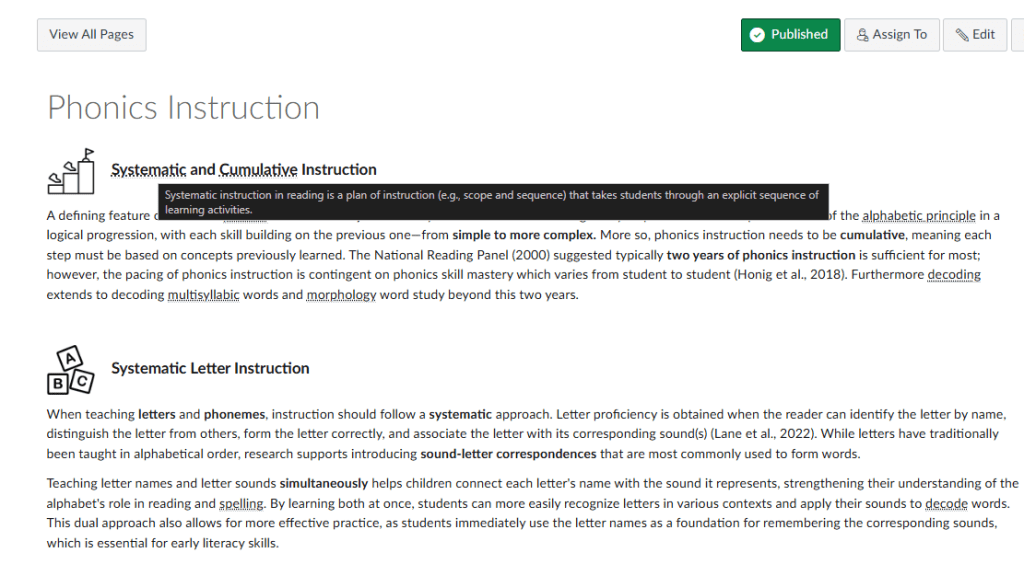
The first iteration emerged from a clear need. Enable hover-based definitions that preserve reading flow while making terminology accessible exactly when and where learners need it. The solution was elegantly simple. A standalone HTML tool that processed content locally in the browser.
Key Features of the Original Tool
The original processor focused on essentials. CSV-driven glossary management made term maintenance straightforward. Direct HTML processing provided immediate visual feedback. A privacy-first approach kept all processing local to the browser. Clean hover-based definitions preserved document formatting. Platform independence meant no external dependencies.
The tool worked by parsing CSV glossary content and processing HTML to wrap terms in <abbr> tags with hover definitions. It solved the immediate problem while respecting both content flow and user privacy.
Access and Implementation
I made the tool available through multiple pathways. Download option through Internet Archive for offline use. Hosted version via tiiny site for immediate testing. Zero barrier entry meant no technical knowledge required beyond basic CSV formatting.
This initial solution served its purpose well, but real-world implementation revealed opportunities for deeper system integration.
The Learning Journey: From Tool to Ecosystem
As educators began using the original processor, patterns emerged that highlighted both its strengths and limitations. The tool worked beautifully for individual content creators, but institutional adoption revealed more complex needs.
Scale challenges meant processing multiple course pages individually was time-intensive. Consistency concerns arose when manual application across courses led to varied implementation. Recovery needs became apparent with no built-in way to undo or modify processed content. Integration gaps showed the disconnect between processing tool and learning management system.
These insights sparked a fundamental question. What if we could integrate glossary processing directly into the learning ecosystem itself?
The Evolution: Canvas Glossary Processor
The second iteration represents a complete rethinking of the problem space. Rather than treating glossary processing as an external tool, this version integrates directly with Canvas LMS through Google Apps Script, creating a comprehensive system for institutional glossary management.
System Architecture
The evolved solution consists of three core components working in harmony.
- Canvas API Wrapper handles all Canvas LMS interactions with robust error handling. It manages pagination for large datasets, includes intelligent URL encoding for problematic page identifiers, and provides comprehensive course data retrieval.
- Enhanced Glossary Processor brings advanced CSV parsing with multiple format support. Safe HTML processing includes validation and malformed content cleanup. Batch processing capabilities enable institutional-scale deployment. Sophisticated pattern matching avoids existing markup.
- Professional Interface guides users through Canvas configuration and glossary validation. Real-time processing feedback includes detailed progress tracking. Recovery tools allow restoring previous page versions. Comprehensive error handling provides troubleshooting support.
Enhanced Capabilities
- Institutional Integration Direct Canvas API connectivity enables seamless course processing. Batch operations work across entire courses or selected pages. Automated validation checks Canvas access and course permissions. Support handles complex page URL structures and special characters.
- Quality Assurance
Pre-processing validation identifies potential issues before they become problems. Intelligent skipping prevents reprocessing already-handled content. Malformed HTML detection includes cleanup capabilities. Page revision history integration enables safe rollback when needed. - Professional Workflow Step-by-step guidance takes users from connection to completion. Real-time progress tracking provides detailed statistics. Comprehensive error reporting includes specific remediation steps. Built-in testing tools help troubleshoot specific pages.
- Recovery and Maintenance Batch restoration returns pages to previous versions when needed. Analysis tools identify problematic page structures before processing. Automated cleanup handles malformed glossary markup. Page revision history integration provides institutional-level safety nets.
Access
Google Apps Script Web Tool
Main Application provides complete Canvas integration with batch processing capabilities. Canvas API Wrapper handles robust LMS interaction management. Glossary Processor enables enhanced CSV parsing and HTML processing. Professional Interface guides implementation workflow from start to finish.
Download the zip of Apps Script files: https://drive.google.com/file/d/1ggZRmUnt06SXlMev3MD994sF2B113jrg/view?usp=sharing
Original HTML Tool
Standalone Processor delivers complete browser-based implementation for individual use.
All source code is included for institutional customization and further development. The modular architecture supports adaptation for different learning management systems and educational contexts.
Original HTML tool available for download here: https://drive.google.com/file/d/1N9ynrm7lgyjao5z-6ddYtPhn7Zb9v_Ng/view?usp=sharing
Ready to enhance terminology support in your learning environment? Start with the approach that best fits your current context. Individual content processing or institutional integration. Let the tools evolve with your needs.
 Brady Licht