
Project Overview
In January 2025, I developed and delivered a training program for administrative staff at Douglas School District focused on enhancing workplace efficiency through Google Workspace tools. The project emerged from a specific need identified by district leadership: administrative assistants needed stronger digital collaboration skills, particularly in Google Sheets.
Research-Based Design Approach
Literature Review Insights
Recent research in workplace training effectiveness shaped our approach:
- Hands-on practice with real workplace scenarios improves skill retention (Bluestone et al., 2013)
- Training that incorporates immediate application to daily tasks leads to better adoption (Ma et al., 2022)
- Real-time collaboration tools can significantly improve administrative efficiency (Parra et al., 2021)
Needs Analysis
The project began with clear parameters from district leadership:
- Three planned sessions throughout the year (this case study is just on the first of the three sessions–with the two following sessions to focus on calendars/meetings, and Drive)
- Focus on Google Workspace efficiency
- Target audience: Administrative assistants
- Initial session duration: 90 minutes
- Emphasis on practical, immediate application
Strategic Group Management
Drawing from research on effective professional development, I implemented a strategic approach to managing varied skill levels:
- Early Skill Assessment
- Used an interactive skill check-in system with colored stickers
- Red: “I teach others Google Sheets”
- Black: “I use it regularly”
- Green: “I’m just getting started”
- Used an interactive skill check-in system with colored stickers
- Group Formation Strategy
- Created mixed-expertise groups of 3-4 people
- Limited to two individuals at any single skill level per group
- Facilitated peer learning while maintaining productive dynamics
- Enabled natural mentorship without formal designation
- Task Design
- Core tasks accessible to all skill levels
- “Level Up” options for advanced users
- Shared group projects to encourage collaboration
- Individual application time for personal work needs
This approach proved particularly effective, as evidenced by participant feedback and engagement levels. Survey results showed that both beginners and advanced users found value in the session, with 96% reporting positive outcomes.
Audience Demographics
Survey data revealed our participant makeup:
- 91% Related Service Provider/Other School Professional
- 9% Administrators
- Varied expertise levels with Google Workspace tools
- Primary focus on administrative tasks
Training Design Philosophy
My approach centered on three core principles:
- Immediate practical application using participants’ actual work materials
- Differentiated instruction through “Try This” and “Level Up” options
- Structured progression from essential to advanced features
Content Structure
The training followed a carefully crafted flow:
- Opening with high-impact “power features” to generate excitement
- Core skills development through guided practice
- Extended learning opportunities for advanced users
- Consistent opportunities to apply learning to real work
Outcomes and Impact
Quantitative Results
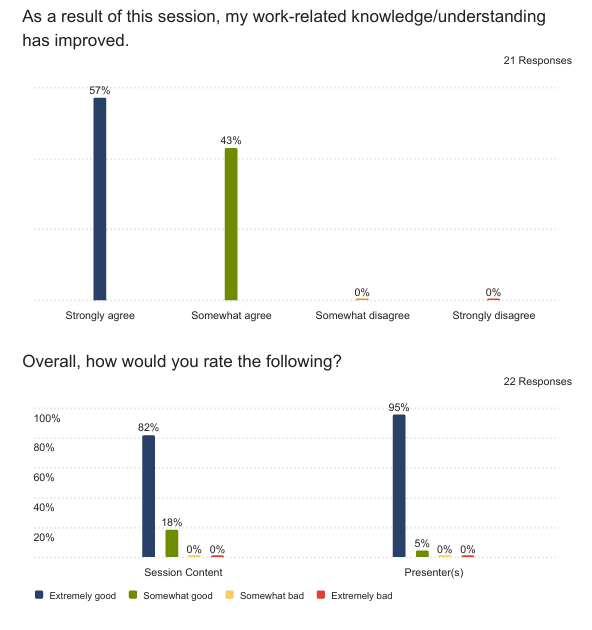
The post-session survey revealed strong positive outcomes:
- 57% strongly agreed their work-related knowledge improved
- 43% somewhat agreed their work-related knowledge improved
- 82% rated session content as “Extremely good”
- 95% rated presenter effectiveness as “Extremely good”
Qualitative Feedback
Participants particularly valued:
- Time management: “Thank you for staying in the time frame”
- Instructional approach: “You were informative, patient, and helpful”
- Future application potential: “I look forward to going back through the presentation”
Key Learnings and Future Implications
Time Management
One significant challenge emerged from participant feedback: “Would have liked a slower-paced session” and “That was definitely a lot for a short amount of time.” To address this, I:
- Provided post-session materials
- Structured future sessions with more practice time
Skill Level Variation
Feedback indicated varying comfort levels with technology. One participant noted: “Maybe save the complex stuff for the end and just start with the simpler stuff.” This led to:
- Redesigning content progression
- Adding clearer differentiation between basic and advanced concepts
- Creating more structured practice time
Other Design Improvements
- Allocate more time for permissions and basic functionality
- Create clearer pathways between basic and advanced content
Success Factors
Elements that proved particularly effective:
- Using participants’ actual work documents
- Providing immediate application opportunities
- Offering differentiated learning paths
- Maintaining strict time management
Conclusion
This case study demonstrates the delicate balance required when designing technical training for diverse skill levels within a limited timeframe. The high satisfaction rates (96% positive feedback) validate the approach while highlighting areas for continued refinement. Future sessions will incorporate learned insights, particularly regarding pacing and the progression from basic to advanced concepts.
The experience reinforces key principles of adult learning: the necessity of immediate application, the value of differentiated instruction, and the importance of connecting training directly to daily work tasks. These insights continue to inform my approach to professional development design and delivery.
 Brady Licht