
A 90-minute Google Sheets session for Douglas School District administrative staff that used a colored-sticker skill check-in and mixed-expertise grouping to make a single session work across a wide range of comfort levels.
- Project Type: Workplace efficiency training (first session in a three-part series)
- Audience/Client: Douglas School District administrative staff
- Timeline: January 2025
- Role: Training designer and facilitator
- Format & Deliverables: 90-minute in-person Google Sheets session; interactive skill check-in with colored stickers; mixed-expertise group structure; differentiated “Try This” and “Level Up” tasks; post-session materials
The Situation
Douglas School District leadership wanted their administrative staff to work more efficiently in Google Workspace, starting with Google Sheets. The difficulty was the room. Some of the people attending taught Sheets to their colleagues, others used it every day, and others were just getting started, and all of them had 90 minutes and their own real work waiting when they got back to their desks. A session pitched at any one of those groups would lose the other two.
The Approach in Brief
Rather than pick a level, I designed the session to use the range. A quick colored-sticker check-in at the start showed where everyone stood, and I used it to build mixed-expertise groups of three or four, with no more than two people at the same level in any group. Every task had a core version anyone could do and a “Level Up” option for people ready for more, and participants worked with their own documents wherever possible so the practice was the work.
What Came Out of It
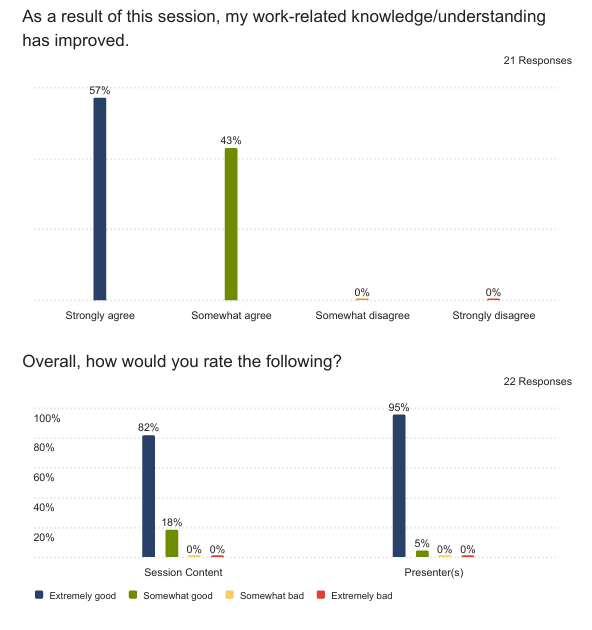
The district’s post-session survey came back positive across skill levels. Every respondent agreed their work-related knowledge had improved, 57 percent strongly and 43 percent somewhat, and 82 percent rated the content as extremely good. Comments pointed to the pacing staying within the time frame and to wanting to go back through the presentation afterward. The same survey also said plainly that it was a lot for 90 minutes, with a few people asking for a slower session that started with simpler material, and that feedback shaped the rest of the series.
Key Takeaway
Mixed-expertise grouping let one session serve a room with very different skill levels, and the peer support did more of the teaching than I did. The real constraint wasn’t differentiation but volume, and the session would have been better with less in it.
Deeper Context
This was the first of three sessions the district planned for the year, with the later two covering calendars and meetings and then Google Drive. Leadership set the parameters: a focus on Google Workspace efficiency, administrative staff as the audience, a 90-minute first session, and an emphasis on things people could put to use right away. Most attendees identified themselves in the survey as related service providers or other school professionals, with a small number of administrators, and their comfort with Google tools ranged widely.
The Journey
I leaned on a few findings from the workplace training literature in planning the session: hands-on practice with real workplace scenarios improves retention (Bluestone et al., 2013), training tied to immediate daily application is more likely to be adopted (Ma et al., 2022), and real-time collaboration tools can meaningfully improve administrative efficiency (Parra et al., 2021). That pushed the design toward participants’ actual documents and away from sample data.
The sticker check-in used three colors: red for “I teach others Google Sheets,” black for “I use it regularly,” and green for “I’m just getting started.” It took a couple of minutes and gave me what I needed to form groups on the spot, and because the groups mixed levels without formally naming anyone a mentor, the more experienced people helped their neighbors without it feeling like an assignment. The tasks were layered the same way, with core “Try This” tasks for everyone, “Level Up” extensions, shared group work, and some individual time to apply things to each person’s own files.
The one choice that didn’t hold up was the opening. I started with a few high-impact “power features” to build interest, on the theory that people would lean in if they saw early what Sheets could do. For the confident users it worked. For the newer ones, it put the hardest material first, and one participant suggested saving the complex features for the end and starting simple, which in hindsight was right.
The Work Itself
Below are the survey results chart and the session slides.
What I’d Change
I tried to fit too much into 90 minutes. The grouping handled the range of skill levels well, but no amount of differentiation makes up for a session that moves faster than half the room can follow. I’d cut the content by a third, spend more of the time on permissions and basic sharing, which turned out to be where many people needed the most help, and build clearer pathways from the basic material to the advanced material so people could see where they were going.
I’d also reverse the order, starting with the simple and everyday and ending with the power features as a preview of what’s possible. After this session I sent out post-session materials so people could revisit what went by too quickly, and I built more practice time into the plans for the later sessions.
Connections
For another case built around a mixed audience, see the Keynote at the Black Hills Library Mini-Conference. For why I try to keep tool training grounded in the work rather than the features, see Let “EdTech” Training Die. If you’re planning training for staff with a wide range of skills, you can reach me at licht.education@gmail.com, and there are more tools, articles, and resources at bradylicht.com.

