
Canvas records a great deal about students that has nothing to do with their schoolwork. It logs when a student last logged in, how long a session lasted, how many times they opened each page, and the sequence of actions they took inside a quiz attempt. It surfaces all of this to teachers through dashboards and reports: classic Course Analytics, New Analytics, the per-user Access Report, the activity columns on the People page. None of it was requested by a teacher, and none of it can be removed by one. It is simply there, a property of the platform, present every time the tool is opened.
What is worth noticing first is how unremarkable it has become. Behavioral monitoring inside a learning management system is rarely argued for or against anymore. It is just a feature, the way a gradebook is a feature, and that ordinariness is itself the thing worth pausing on. This page, and the extension it describes, begins from a different position: that this monitoring is surveillance, that it has become a default rather than a necessity, and that a teacher should be able to refuse to participate in it.
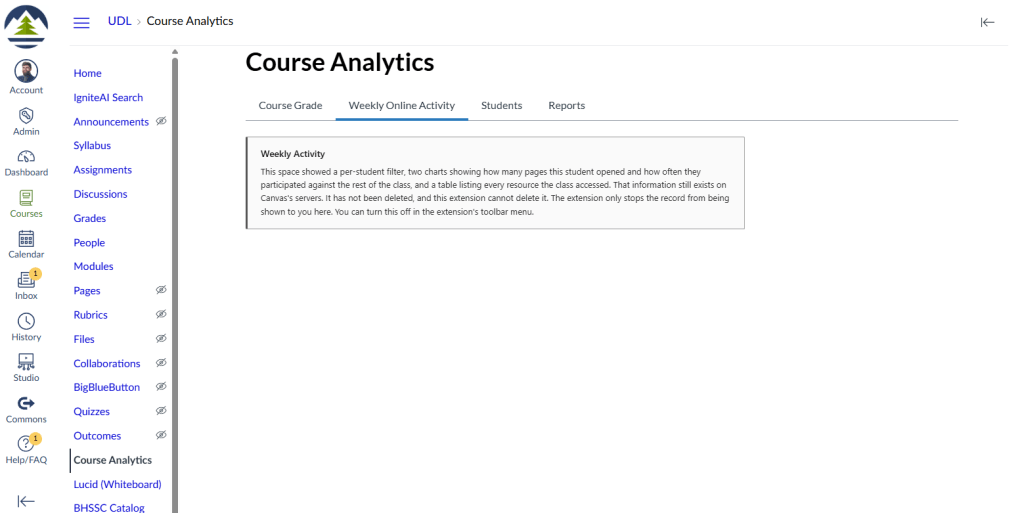
Behavioral Surveillance Refusal is a Chrome extension that makes that refusal possible, in a deliberately bounded way. Once installed, it hides the parts of Canvas that report on student behavior rather than student work, and it does so only for the teacher who installs it, only in that teacher’s own browser. It changes nothing for students or for other teachers, and it does not touch grades or submitted assignments. It is opt-in and reversible. Turning it off restores Canvas to its ordinary state.
It will help to be honest about the shape of the claim the tool is making, because the claim is the point of the tool at least as much as the function is.
What the tool argues, and what it does not pretend
The surveillance is built into the platform’s design, not added on top of it. This part of the argument draws on Michael Apple’s idea of technical control, developed in his 1982 book Education and Power. Technical control names the way authority can be lodged inside the form of the work itself, so that it operates without anyone standing over a worker to enforce it. The control is in the structure rather than in a supervisor. Applied to a learning management system, the behavioral monitoring is a property of how Canvas is designed rather than a decision any individual teacher made. That is why a teacher can refuse what the design offers but cannot, alone, redesign it. The reach of an individual ends well short of the platform.
This sets a real limit, and the honest move is to keep that limit in view rather than engineer around it. A teacher who installs this extension has not defeated surveillance or weakened it, and has not protected a single student from it. The data is still collected and stored, and it remains available to administrators, to the vendor, and through Canvas’s own interface and mobile apps, none of which this extension touches. What changes is narrow and specific. One teacher has decided what will and will not occupy their attention while they work.
The case for doing that anyway draws on James Scott’s idea of the weapons of the weak, from his 1985 book of that name. Scott studied the everyday, low-profile, uncoordinated forms of resistance available to people who are in no position to mount an open challenge to a structure they are subject to. These acts are quiet and individual, and Scott is careful, in the same work, to warn against romanticizing them. He is explicit that they tend to affect the structures they push against only marginally. That combination, an act that is genuine resistance while remaining insufficient on its own, is the exact shape of what this extension offers. Refusing to look is meaningful, but on its own it changes nothing structural, and a tool of this kind is only honest if it keeps both of those facts in view.
It is worth being precise about what kind of act this is. The extension does not feed false data into Canvas, and it does not interfere with what the platform collects or attempt to deceive any system. It adds nothing and blocks nothing on the vendor’s side. Behavioral data of this kind is gathered for the platform and its institutional customers, a point Shoshana Zuboff’s work makes about behavioral data generally, and a teacher who refuses to look at a dashboard does not touch the extraction that produced it. This is a refusal of consumption on the teacher’s side, not an interruption of collection.

How the extension sorts what it sees
The extension rests on a single distinction, so that what it acts on is principled rather than a list of screens someone happened to dislike. The distinction is whether a piece of data is something the student authored and submitted as a communication, or something the system generated about the student as a byproduct of their presence. Authored work is the substance of a teaching relationship. The student made it and chose to hand it over, knowing the teacher will read it. Byproduct data accrues whether or not the student does anything deliberate. The student usually did not author it, often cannot see it, and it reaches the teacher asymmetrically. Students are also required to be inside these systems as a condition of their schooling, so they cannot decline the collection the way a person can decline a consumer service. That asymmetry, and the fact that no student agreed to it, is what makes byproduct data surveillance in the sense this project uses the word.
From that distinction, three tiers follow:
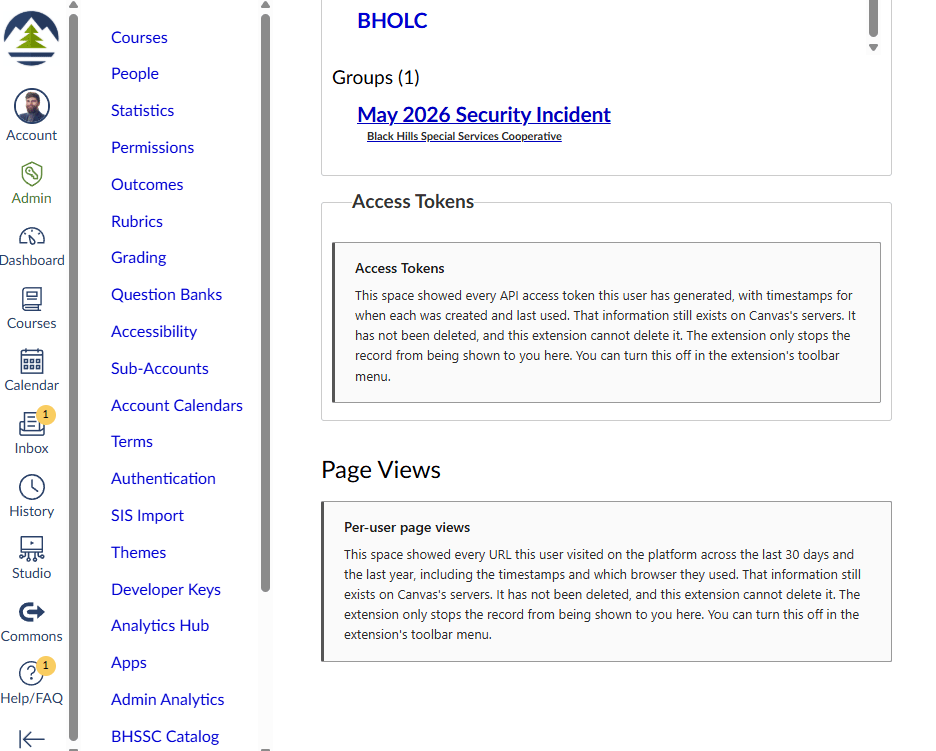
- The first tier is clear surveillance, the byproduct data about a student’s presence and process. In Canvas this includes last login and last activity, the page views and participation counts in classic Analytics, the per-user Access Report, the activity views in New Analytics, the quiz log that records a student’s actions during an attempt, and the last-accessed columns on the People page. The extension hides these by default and replaces each one with a small card in its place. The sharpest cases in this tier are the surfaces that rank a student against a class average. A ranking against a norm, presented as a neutral readout, is close to what Foucault called normalizing judgment, and it is arguably the least defensible of these surfaces. The extension treats those ranking surfaces as the core of what it removes.
- The second tier is pedagogical data, and the extension never touches any of it. This is submitted assignments and their contents, quiz answers, discussion posts, grades, written feedback, and the gradebook as the record of assessment. Leaving this tier completely visible is structural to the project rather than incidental. A tool that hid grades could be dismissed as anti-accountability in a single sentence. A tool that leaves the entire assessment record in place and removes only the ambient behavioral log is making a precise argument, and that precision is most of what makes it defensible.
- The third tier is the harder one, and it is where the real difficulty of the project sits. Some byproduct data is structurally fused to authored work and cannot be cleanly separated from it. The clearest case is the timestamp on a submitted essay, along with the late flag derived from that timestamp. The timestamp is presence data, but it is welded to an assignment the student genuinely wrote, and hiding it usually means hiding the work. This is not a flaw in the taxonomy. It is the platform’s technical control made visible, the surveillance gaze braided into the ordinary act of grading until the two cannot be pulled apart. For this tier the extension annotates rather than hides. It leaves the work visible and places a small marker beside the byproduct datum, naming it as presence data rather than part of the work. This tier is also where the configuration lives. A teacher can escalate a marker to a full hide where that is technically possible without breaking the legitimate work, or turn the annotation off entirely.
Replacing rather than hiding
There is a reason the extension replaces a surveillance surface with a visible card instead of simply making it disappear. A silent removal would leave the page looking ordinary, as though the data had never been there, and that would quietly undo the argument. The card does the opposite. It names what used to occupy that space and states plainly that the data still exists on the vendor’s servers and has not been deleted. The marked absence is the point. It makes the surveillance visible precisely by showing where it was, and it keeps faith with the honesty the rest of the project depends on.
The card states its piece once and clearly. It does not reappear on every page load or repeat its message, because a tool that lectures the teacher who installed it will be uninstalled within a week, and the argument will go with it. Everything the extension does is controlled from a small popup that opens when the teacher clicks its icon, and every surface can be switched on or off individually. The teacher is the one deciding, which is the entire premise.
The limits, stated plainly
Honesty about what the extension cannot do is part of the tool, not a disclaimer attached to the end of it. The extension is cosmetic and client-side. It changes what is drawn on the screen in one browser and nothing else. It can be bypassed through Canvas’s own interface, its API, or its mobile apps, none of which it touches. It does not stop Canvas or a district from collecting, storing, or using behavioral data, and it cannot. It is not a privacy tool or a security tool in any technical sense, and it should not be mistaken for one. It does not protect students.
There is a further limit worth naming, because it cuts close to the project’s own argument. This is a browser extension. It depends on Google’s browser, and for many users on Google’s policies about what may run inside it. A tool that criticizes platform dependency is itself entangled in platform dependency. That is not a problem the project failed to notice. It is the same technical control argument turning up on the tool itself, and stating it openly is more convincing than any defense would be.
Within those limits, the practical facts are straightforward. A student’s view of Canvas is identical whether or not their teacher uses this. Other teachers and administrators see nothing different, and neither does the institution. Grades and submitted work are left alone. The extension has no server and sends nothing anywhere, it collects nothing about the teacher using it, and its settings live in the browser’s own storage and go no further.
The objection worth taking seriously
The strongest objection to all of this is the early-alert argument, and it deserves a direct answer rather than a footnote. Activity monitoring, the argument goes, lets a teacher catch a disengaged student before they fail. A last login drops off, page views fall, and a teacher who is paying attention can reach out before the student is too far behind to recover. On that view, refusing to look abandons exactly the students who most need a teacher watching.
The answer begins with what presence actually tells you. A student can be logged in for an hour and learn nothing, or be off the platform entirely and be fine. Presence is a weak proxy for learning. The signal that genuinely shows a student is struggling is the work itself, and the work sits in the second tier, fully visible and untouched by this extension. Removing the behavioral log removes a noisy proxy. It does not remove a teacher’s ability to see that a student has stopped turning things in.
There is one honest concession. In a fully asynchronous course with no in-person contact and infrequent submissions, a last-activity date may genuinely be the earliest sign that a student has gone quiet. The project does not wave that away. It is one of the reasons the unit of refusal is the individual teacher rather than a district policy, and one of the reasons the welded tier is configurable. A teacher in that situation can keep last activity visible while still refusing page-view granularity. The taxonomy supports that choice instead of mandating a single answer for every context.
Installing it
One limitation is worth knowing before you start, because it will save some teachers a frustrating twenty minutes. Many districts manage their Chromebooks and staff Chrome profiles through Google Admin, and a managed device or profile usually blocks both Developer mode and the loading of extensions from a file. If that describes your setup, this extension will not install, and there is nothing you can do about it from your end. That block is set by your district, not by the tool. The extension works on a personal computer or an unmanaged Chrome profile. On a locked-down district Chromebook it will most likely be blocked.
The extension is hosted as a downloadable file rather than through the Chrome Web Store, so installing it means a process called sideloading. Sideloading is a normal, supported Chrome feature, and it takes only a few more steps than a store installation.
- Download the extension file from the link above and unzip it. It arrives as a compressed folder, and unzipping it produces a regular folder. Put that folder somewhere you will not accidentally delete it, because Chrome loads the extension from that folder every time it starts. A folder inside your Documents is fine.
- Open Chrome, type
chrome://extensionsinto the address bar, and press Enter. - Find the switch labeled “Developer mode” in the top right corner of that page and turn it on. This is what allows Chrome to load an extension from a folder. Developer mode is a standard Chrome feature, and turning it on is safe. Chrome will show a small reminder about developer extensions each time the browser starts, and that reminder is expected rather than a sign that something is wrong.
- A button labeled “Load unpacked” appears once Developer mode is on. Click it, then select the unzipped folder from the first step. The extension appears in your list, and its icon appears in the Chrome toolbar.
- Click the extension’s icon to open its popup, and switch surfaces on or off from there. The first time you visit a Canvas page, the hidden surfaces are already replaced with cards.
One thing to keep in mind afterward: the extension stays loaded only as long as its folder stays where it is. If you move or delete that folder, the extension stops working. That is simply how loading an extension from a file works, and it is the reason for putting the folder somewhere stable in the first step.
What this is, finally
It is worth being plain about what this project is, because it is not quite an ordinary tool. It is first a work of critical design, an object built to make an argument, and the argument lives as much in how the tool is framed and written about as in what its code does. It is, second, a research artifact, connected to doctoral work on vendor platform dependency in rural educational technology and to the question of how much control commercial platforms hold over the districts and teachers that depend on them. It is, third and last, a working tool that a teacher can genuinely install and use. All three are real, and the ordering matters. It is why a small number of teachers using this as a deliberate choice is the outcome the project is aiming for, rather than a large number of installs. It is also why the extension is something a teacher installs for themselves, and why there is deliberately no version an administrator could roll out across a district. A refusal that is imposed on a teacher would no longer be a refusal.
That ordering also shapes an honest decision about maintenance. I am not planning to maintain this extension actively. Canvas changes over time, and several of the surfaces this tool targets are identified by patterns in Canvas’s page structure that Instructure can change without notice. When that happens, a surface the extension used to hide will reappear until the extension is updated, and an unmaintained version will gradually become less effective. A few of the targeted surfaces were identified from Canvas’s documented behavior rather than confirmed on a live system, so those are the most likely to need correction first.
I am leaving that as it is, and not only for lack of time. The eventual breakage is part of what the project has to say. A tool that stops working because the vendor unilaterally changed the environment it runs in is a demonstration, on the tool itself, of the same power over a teacher’s working environment that the project is about. That said, if you install it, try it, and run into a problem, please do reach out at licht.education@gmail.com. I would like to hear what you find.
The extension and its materials are released under Creative Commons Attribution 4.0, the same license as the other tools on bradylicht.com. It is free and open, and you are welcome to use and adapt it with attribution.
If you are a teacher, the most useful thing the extension can do is probably not the hiding itself. It is the noticing. Installing it, working for a week with the behavioral surfaces replaced by cards, and paying attention to whether your read on a particular student shifts is a small experiment in how much those numbers were shaping your judgment to begin with. You may decide you want them back, and that is a legitimate outcome the extension makes available with a single click. The point was never to take the choice away. It was to make the choice visible, and to put it in the hands of the person doing the teaching.

