
Overview
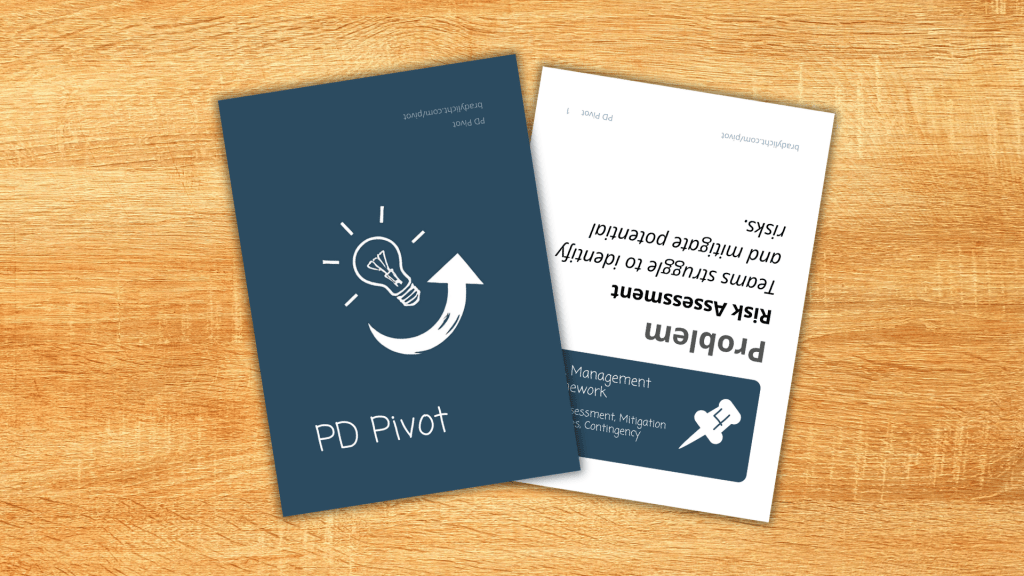
Pivot is a strategic card game where players craft and adapt learning design solutions using research-based principles.
Players must solve realistic scenarios with the design approaches they’re dealt, then adapt as new requirements emerge. This mirrors real learning design work: balancing stakeholder needs, working with available resources, and maintaining quality while adapting to change.
The game builds team capacity through play, helping designers develop shared vocabulary and practice adapting solutions under pressure. Through this blend of game mechanics and learning design principles, Pivot serves as both an engaging team activity and a practical professional development tool.
Two Versions. One Core Experience.
PD Pivot: Design and adapt professional development in this strategy card game. Pivot your solutions as K-12 education needs evolve and new challenges emerge.
L&D Pivot: Design learning experiences that adapt to workplace challenges in this strategy card game. Transform your solutions as organizational requirements shift.
Core Concepts
1) Making It Work vs. Making It Great
Pivot mirrors the fundamental challenge of learning design: creating solutions that both work and excel. Just as in real-world design projects, success has two dimensions. First, you must develop a viable solution that meets all stakeholder requirements – this is your baseline for “making it work.” However, the quality of your solution – how well you incorporate research-based principles and proven approaches – determines your level of mastery.
2) Adapting vs. Defaulting
One of the most common pitfalls in learning design is falling back on familiar solutions. We all have our favorite approaches – whether it’s breaking everything into e-learning modules, defaulting to workshop formats, or relying heavily on job aids. As new scenarios emerge each round, even carefully crafted solutions must evolve or be rebuilt. A perfect workshop-based solution might need to shift when requirements demand asynchronous delivery, or a technology-heavy approach might need rethinking when resources are limited. This mirrors real-world design challenges, where changing requirements and contexts often force us to adapt or reimagine our initial solutions.
3) Individual Solutions vs. Collective Wisdom
Learning design thrives on the synthesis of diverse perspectives and experiences. Many learning and development teams bring together former teachers, subject matter experts, HR professionals, and technical specialists – each bringing unique approaches to training and development. While individual expertise is valuable, the best solutions often emerge through the creative combination of different viewpoints. Pivot reinforces this through its core mechanics: by distributing design cards among players, the game ensures that no one person holds all the tools. Success requires looking beyond individual preferences to build solutions that draw on the team’s collective wisdom.
Licensing and Availability
Free Downloads
All versions of Pivot are available for free download and printing.
The newest version (1.1) of PD Pivot will need to be printed four to a page for recommended size. Note that this new version no longer includes unique points for scoring but instead uses total design cards/pins used.
There are blank pivot cards that can provide a foundation for creating alternative versions of the game. Teams could use these to create versions for graphic design, web development, product management, and other disciplines where iterative design and stakeholder requirements play key roles.
Creative Commons License

Pivot is released under a Creative Commons Attribution-NonCommercial-ShareAlike (CC BY-NC-SA) license. This means you are free to:
- Download and use the game
- Share and redistribute the materials
- Adapt and modify the game for your needs
- Create new versions for specific contexts
As long as you:
- Give appropriate credit
- Do not use the material for commercial purposes
- Share any adaptations under the same license
Premium Versions
For teams that use Pivot regularly, premium printed versions are available. Premium versions are available at cost – pricing covers only printing, storage, and shipping expenses. I do not generate revenue from these versions; they exist purely to support teams that find regular value in the game.
Purchase PDPivot Premium Cards
Remember: The premium versions are identical in content to the free versions. The only difference is the production quality and included physical materials.
Additional Resources
Full Instructions
Click here to see the full instructions.
Play Structure
Pivot is played over three rounds, with players or teams working to create and adapt learning design solutions. The game uses a single deck of cards, with each card having a scenario on one side and a design principle on the other.
Setup
Begin by shuffling the deck thoroughly. Draw 12 cards to serve as your design cards for this game, setting them design-side up. These represent the design principles available during play. Divide these evenly among players or teams – with two teams, each gets six cards; with three players, each gets four cards; and so on. Place the remaining cards scenario-side up to form your scenario deck.
Draw three cards at random from the scenario deck to establish your initial challenge. If no problem card appears in your initial draw, you may choose any training focus until a problem card emerges in later rounds. All scenario cards, regardless of type, add important context and constraints to your solution.
Optional: For a more structured experience, players may draw until they have one of each type (Problem, Context, and Requirement), returning additional cards to the bottom of the deck and using only the first one drawn of each type.
Creating Solutions
Each round follows the same basic structure:
- Analyze the active scenario cards
- Create or adapt your solution
- Consider which design cards complement your approach
- Document your solution
Your solution should primarily draw from your own experience and expertise in learning design. Design cards are optional tools that can enhance your solution or encourage you to consider additional approaches. While your solution can include elements beyond what’s suggested by the cards you play, incorporating more design cards effectively will lead to higher scores. The challenge lies in maximizing your use of design principles while ensuring your solution remains coherent and fully addresses all scenario requirements.
Remember: Your solution must address all active scenario requirements to be considered viable. Document your solution, explaining how it works, and note which design cards support or enhance your approach. Success comes from finding the sweet spot between incorporating many design principles and maintaining a practical, effective solution.
Round Structure
- Round 1 (15 minutes): Create your initial solution using the first three scenario cards
- Round 2 (10 minutes): Draw a new scenario card and adapt your solution
- Round 3 (10 minutes): Draw the final scenario card and complete your solution
When new scenarios appear, you may keep or change which design cards you’re using. However, you can only use design cards that your team/player holds. Your final score is based on the point values of design cards used in your final, viable solution.
Scoring
For a solution to score any points, it must successfully address all active scenario cards. Assuming your solution is viable, add up the points from all design cards you used in your final solution:
- Master Designer: 30+ points
- Skilled Designer: 15-29 points
- Developing Designer: Under 15 points
Solution Requirements
The following guidelines exist to help teams evaluate solutions consistently and resolve any disagreements about viability. However, every team should adapt these requirements to match their needs, time constraints, and preferred level of detail. Some teams might prefer quick, high-level solutions while others might benefit from more thorough documentation. What matters most is that all players agree on expectations before starting.
Core Components
- Clear Implementation Plan
- Specific activities or interventions
- Timeline or sequence
- Roles and responsibilities
- Resource requirements
- Scenario Alignment
- Addresses the main problem
- Fits the given context
- Meets all requirements
- Maintains internal consistency
- Design Card Integration
- Explicit connection between cards and solution elements
- Logical use of each design principle
- Clear explanation of how principles work together
Documentation Format
Your solution should be written in enough detail that another team could understand and implement it. Include:
- Overall approach
- Key activities or components
- How it addresses each scenario
- Which design principles support which elements
- Any assumptions or dependencies
Solution Viability
When evaluating solutions, consider:
- Would this work in the real world?
- Does it respect given constraints?
- Are the components coherent?
- Is it appropriately scaled?
- Does it solve the core problem?
Remember: A lower-scoring viable solution is better than a higher-scoring solution that doesn’t meet all requirements. This reflects the reality that an elegant design that doesn’t solve the core problem isn’t truly successful.
Team Variations
Competitive Team Play (2-4 teams)
Teams compete using the same scenario cards but with their own sets of design cards. This creates an interesting dynamic where teams face identical challenges but must solve them using different design approaches. Each team receives an equal share of the 12 design cards (6 cards for two teams, 4 cards for three teams). Teams work independently during rounds but share and compare solutions during scoring.
Collaborative Team Play (4-6 players per team)
Larger groups can form teams that work together on solutions. Each team member brings their perspective to solution development while sharing their design cards. This format works particularly well for professional development, as it encourages discussion about design choices and trade-offs. Teams can even rotate solution writers each round to ensure full participation.
Example of Play
Click here to explore an example of the game in action.
Three instructional designers – Sarah, Marcus, and Jin – are starting a game of PD Pivot. They’ve shuffled the deck and dealt out four design cards each (12 cards total for a three-player game).
Setup
Sarah spreads out her design cards: “Okay, I’ve got Professional Learning Communities, Data Analysis Protocol, Implementation Planning Tools, and Microlearning Strategy. Pretty good mix.”
Marcus nods while organizing his cards: “I’ve got some theory cards here – Adult Learning Theory, Universal Design for Learning, Evidence-Based Practice Design, and Digital Learning Environment.”
Jin reviews their hand: “And I’ve got Change Management Framework, Lesson Study Cycles, Collaborative Inquiry Process, and Learning Analytics Dashboard. Let’s see what challenge we’re facing.”
They draw their three initial scenario cards:
- Problem: “Teachers are implementing standards-based grading in conflicting ways.”
- Context: “This is at a rural district school where teachers work with multiple grade levels and limited local resources.”
- Requirement: “All training must be delivered in 45-minute segments during existing planning periods.”
Round 1: Creating the Initial Solution
Marcus leans forward, “Okay, rural school, limited resources, and we need to fix inconsistent grading. Plus everything has to fit into 45-minute chunks. Thoughts?”
“Well,” Sarah considers, “I could use my Professional Learning Communities card. We could create grade-level teams that meet during planning periods to align their grading practices.”
Jin nods, “That makes sense. I could add my Lesson Study Cycles. Teams could review actual student work together, grade it, and compare their reasoning.”
“I like where this is going,” Marcus adds. “My Universal Design for Learning card could help us make sure the grading system works for all students. But maybe that’s trying to solve too much at once?”
Sarah sketches on her paper. “Let’s start with the foundation. I’ll play Professional Learning Communities for the structure, and I’ll add my Microlearning Strategy to break things into 45-minute chunks.”
Jin points to their context card. “Don’t forget we’re working with limited resources. Maybe hold off on my Lesson Study Cycles – that might be too time-intensive. Instead, I’ll play Collaborative Inquiry Process. It’s lighter weight but still gets teachers working together.”
They document their initial solution, playing three cards:
- Collaborative Inquiry Process (3 points)
- Professional Learning Communities (4 points)
- Microlearning Strategy (3 points)
Round 2: Adapting to Change
The team draws their next scenario card: “Implementation must work across multiple school sites simultaneously.”
“Oh boy,” Sarah sits back. “That changes things. Our nice neat grade-level teams just got more complicated.”
Marcus spreads out his remaining cards. “I’ve got Digital Learning Environment. We could use that to connect teams across schools.”
Jin shakes their head. “But remember our context – limited resources. Can we assume they have the technology for that?”
“Good point,” Sarah says, sketching. “But we might need it. Our PLCs need some way to stay aligned across buildings. What if we keep the in-person grade level teams but add the digital component for cross-site sharing?”
Marcus plays his card. “Exactly. Digital Learning Environment doesn’t have to mean anything fancy. Even just a shared drive and simple video calls could work.”
“Okay,” Jin reviews their solution. “So we’re keeping Professional Learning Communities, Microlearning Strategy, and Collaborative Inquiry Process, and adding Digital Learning Environment?”
Sarah nods. “That’s 13 points so far. More importantly, it’s still a workable solution. The 45-minute chunks still happen in person, but now teams can share their work across schools.”
Round 3: Final Challenge
The final scenario card is revealed: “Teachers must submit evidence of implementation monthly.”
Marcus groans. “Now we need some way to track all of this.”
“Actually,” Jin brightens, “my Learning Analytics Dashboard would be perfect here. We can use it to track submissions and monitor progress.”
Sarah starts revising their solution sketch. “That makes sense. The dashboard could even help teams see how other schools are progressing.”
“Wait,” Marcus interrupts. “I’ve still got Evidence-Based Practice Design. Instead of just tracking submission, shouldn’t we make sure what they’re submitting actually shows improved grading practices?”
Jin considers this. “That’s a stronger approach. The dashboard would just track completion. Evidence-Based Practice Design would help us know if it’s working.”
“And,” Sarah adds, “it builds on our PLC structure. Teams can use the evidence to improve their practice, not just prove they did it.”
They revise their final solution:
- Professional Learning Communities (4 points)
- Microlearning Strategy (3 points)
- Collaborative Inquiry Process (3 points)
- Digital Learning Environment (4 points)
- Evidence-Based Practice Design (4 points)
“18 points total,” Jin calculates. “Skilled Designer level. More importantly, look how the solution evolved while staying true to our core approach.”
Sarah reviews their work. “Yeah, we started with collaborative teams, then connected them digitally, and finally added a way to prove it’s working. Each piece builds on the others.”
Marcus starts packing up his cards. “And we never played Adult Learning Theory or Universal Design for Learning, even though they’re great cards. They just weren’t right for this solution.”
“That’s the point, isn’t it?” Jin remarks. “Sometimes your favorite approaches aren’t the right ones for the situation.”
Implementation Tips
Click here to see implementation tips.
Pivot works best when facilitators understand its dual nature: it’s both a game and a learning tool. Your role is to keep gameplay flowing while drawing out learning moments and connecting them to real-world practice. This guide will help you achieve both aims effectively.
Before the Session
Spend time reviewing the cards before playing. Understand both their individual meanings and how they might work together. While you don’t need deep knowledge of every design principle, you should be comfortable explaining basic concepts and asking guiding questions about their application. Set up your space with enough room for teams to work independently while still being able to share and discuss solutions easily. Have scratch paper ready – participants will need it for solution documentation.
Running the Game
Start by clearly explaining the core tension of the game: solutions must work (by addressing all scenarios) while also incorporating strong design principles (to score points). Emphasize that this mirrors real-world learning design, where we must balance pragmatic needs with quality approaches. When dealing cards, remind players that working with the cards they’re dealt, rather than their preferred approaches, is part of the challenge.
As teams play, maintain strict time limits for each round – this pressure helps simulate real project constraints. Give two-minute warnings before the end of each round. Between rounds, facilitate quick solution sharing. Ask teams to explain not just what they did, but why they made those choices. When new scenario cards appear, encourage teams to think through implications before jumping to changes.
Learning Moments
Watch for key learning opportunities: when teams discover card combinations that work particularly well, when they have to abandon an approach they like, or when they find creative ways to work within constraints. Draw attention to these moments with questions like “How might this situation show up in your real work?” or “What principles from this solution could apply to other challenges?”
Variations
For experienced teams, consider having them create their own scenario cards based on real challenges they face. This helps connect game concepts directly to their work. With newer teams, you might start with just two rounds to keep things simpler. For larger groups, team play often works better than individual play, as it encourages discussion and shared learning.
Debrief
End each session with reflection. Have teams share not just their final solutions, but how their thinking evolved through the rounds. Ask what surprised them, what they learned about their design tendencies, and what they might do differently in their next game – or their next real project. Connect game experiences to actual work challenges, helping participants see how they can apply what they’ve learned.
 Brady Licht