
A retrospective on a JavaScript tool I built as a remedial reading teacher to automate personalized practice plans, revisited in light of how AI-assisted coding has lowered the barrier for teachers to build their own classroom tools.
- Project Type: Custom classroom tool build and reflection
- Audience: Originally remedial reading students at an alternative high school; reflection piece aimed at fellow educators
- Role: Classroom teacher, self-taught developer, conference presenter
- Format & Deliverables: JavaScript-based personalized reading practice plan generator (hosted on GitHub); TIE Conference poster session; nine-step teacher-coder framework; reflective follow-up case
The Original Problem
Several years ago, I stood in front of a poster board at the TIE Conference (TIE is now Compass Partners in Learning, where I work) explaining why I’d spent weeks learning JavaScript. The reason was simple: I had a problem that no existing EdTech tool could solve.
I taught remedial reading at an alternative high school where personalized learning was a core initiative. Each of my students needed a customized practice plan based on their reading speed, available time, learning preferences, technology access, peer availability, skill needs, and reading level. Creating these plans took 3-5 days per cycle using paper assessments, discussions, and flow charts. The process worked, but it was time-consuming and difficult for students to complete even with extensive support.
I searched for existing tools that could handle this many variables, and when nothing I found came close, I learned to code.
The Solution
The tool I built was straightforward by developer standards, but it made a real difference in my classroom. It asked students a series of questions, processed their responses through if-then logic I’d mapped out, and generated a personalized reading practice plan. What took days on paper now took minutes on screen.
The process I outlined on that poster had nine steps, and it became a template I’d come back to repeatedly: 1) identify the problem, 2) search for existing solutions, 3) select a programming language, 4) find resources, 5) learn and practice, 6) plan the components, 7) build and test each piece, 8) assemble and share, and 9) refine and reflect.
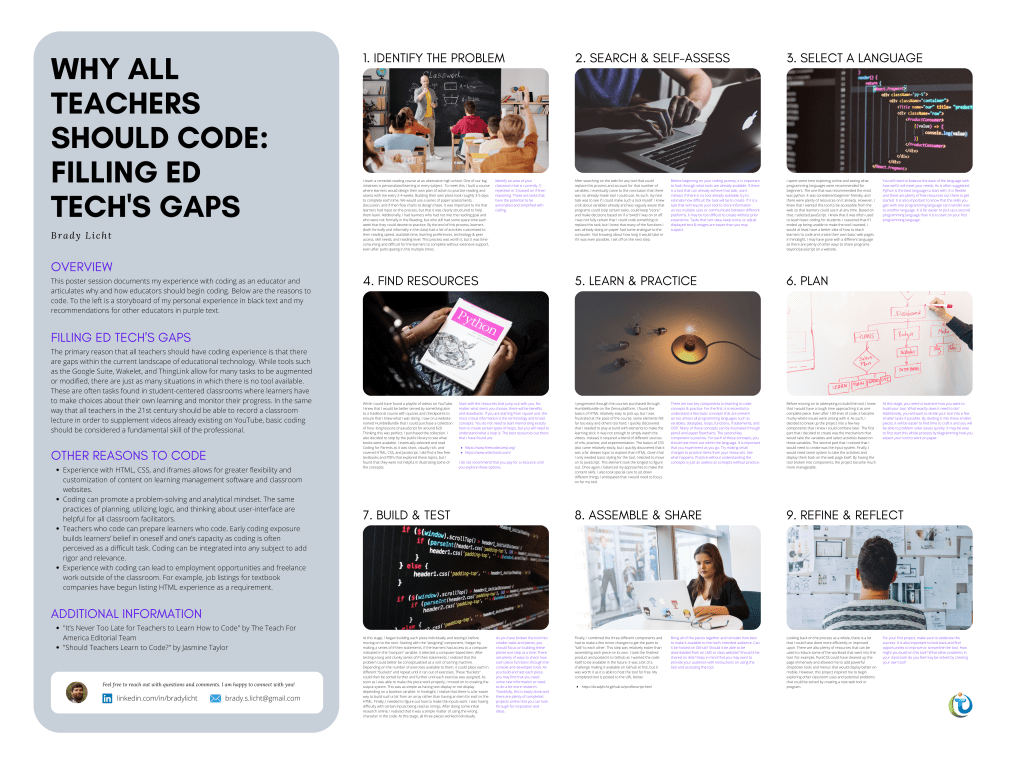
Looking back, my code was clunky. I used far more if-then statements than necessary before realizing I could conceptualize the problem as a sorting mechanism. I posted the finished product to GitHub anyway, both to make it accessible and to preserve the learning process.
You can see this product here: https://bradylicht.github.io/profilescript.html
What Has Changed
The landscape for teacher-coders has shifted a fair amount since that conference presentation. The barriers to entry are lower, and the reasons to build haven’t gone away.
The biggest shift is AI-assisted coding. Services like GitHub Copilot, ChatGPT, and Claude can help teachers write simple programs, debug errors, and understand code structure without the learning curve I faced. A teacher can describe what they need in plain language and get working code with explanations. That doesn’t remove the need to understand basic programming concepts, but it shortens the path from idea to working tool considerably.
The gaps those tools can fill haven’t closed, either. Platforms are more sophisticated than they were, but they still can’t address the specific needs of individual classrooms. A physics teacher might need a simulation that behaves differently than existing options, and an English teacher might want to track student progress through choice reading in a particular way. These gaps persist in that EdTech companies build for broad markets rather than individual contexts.
Cost plays a part as well. School budgets are under constant pressure while subscription costs climb, and a teacher who can build a simple attendance tracker, assignment randomizer, or progress dashboard gets the functionality they need without adding another license to the list.
Why should teachers still code?
The reasons I gave on the poster still hold, and a few have become more pressing. Customization is the most direct one: learning management systems and classroom websites still benefit from teachers who understand HTML, CSS, and basic JavaScript, and that understanding makes for better experiences for students. Beyond that, planning code structure, working through logic, and thinking about an interface all carry over to how we design learning experiences. Teachers who code are also better placed to support students who code, since early exposure builds confidence and takes some of the mystery out of what many see as an intimidating skill.
There’s the matter of time as well. A few hours spent on a tool can save a fair amount of time over a school year, whether it handles grading, student grouping, or progress tracking built to your exact specifications.
Getting Started Now
The resources for beginning teacher-coders have improved a great deal. FreeCodeCamp and W3Schools remain good starting points, now supplemented by AI assistants that can explain concepts, generate examples, and troubleshoot errors in real time.
The key difference between then and now is that you don’t need to become an expert to create useful tools. AI assistance lets you focus on clearly defining what you need while getting help with implementation details. The core skill isn’t memorizing syntax but understanding logic, planning structure, and testing thoroughly.
Start with something simple that solves a real problem in your classroom. Maybe you need a random group generator with specific constraints. Perhaps you want to create custom flashcards that behave differently than existing apps. Or you might need a way for students to track their progress through choice-based learning that reflects your specific approach.
From there, break the project into smaller pieces and build one component at a time, testing as you go. Ask AI tools for help when you get stuck, and share your work with other teachers who might benefit.
The Broader Picture
The poster session argued that basic coding should be considered a fundamental skill for educators, similar to recording a video or creating a slide presentation.
I’d qualify that argument now. Since the poster, I’ve spent a fair amount of time on what happens after a teacher-built tool works: who maintains it when the teacher leaves, what it depends on, and how much of the thinking gets handed to the AI that helped build it. I’ve written about that in the vibe coding in EdTech series, and none of it has talked me out of the idea that teachers should be able to build, though it has changed how I’d describe what building asks of them.
We operate in an era where technology mediates much of education, yet many teachers feel constrained by the tools provided to them. Learning to code is learning to create rather than merely consume educational technology, and it gives teachers an active role in shaping the digital learning environments our students inhabit.
Commercial tools serve broad needs reasonably well but rarely fit specific contexts, and teachers who can code can fill those gaps for themselves and their students.
This doesn’t mean every teacher needs to become a software developer. But every teacher should understand enough about how digital tools work to modify them, combine them in novel ways, or build simple solutions when nothing else fits, and that’s more within reach now than it was when I started.
Building that reading tool taught me to see problems differently, to recognize when a technical solution might save time and improve outcomes, and to believe I could create that solution myself.
That’s the real reason all teachers should code, not because we all need to become programmers, but because understanding how to create technology gives us agency in educational spaces increasingly defined by it.
If you’ve built a tool for your own classroom, I’d like to hear about it. You can reach me at licht.education@gmail.com, and there are more tools, articles, and resources at bradylicht.com.

